May 26, 2022
Solved

Unpaid Invoices Reducing Balance of Operating Account

  • May 26, 2022
  • 2 replies
  • 0 views

Having trouble understanding our accounts receivables. We invoice a customer for $200, due at some point in the future. Everything appears correct - customer has a $200 outstanding balance in the "customer center", and accounts receivable increases by $200. However, our primary/operating account also goes down by $200 and a new line item (an INV) has appeared in our general ledger as a debit. As a result, our corporate checking account is now $200 less than its actual balance. I do not understand why this debit transaction is being created. Please help. Thanks,  
Best answer by CharleneMaeF

Let me help you sort this out, nkastner.


Typically, a business sends an invoice to a client after they deliver the product or service. This will add a journal entry as a debit in the accounts receivable account and a credit in the sales account.


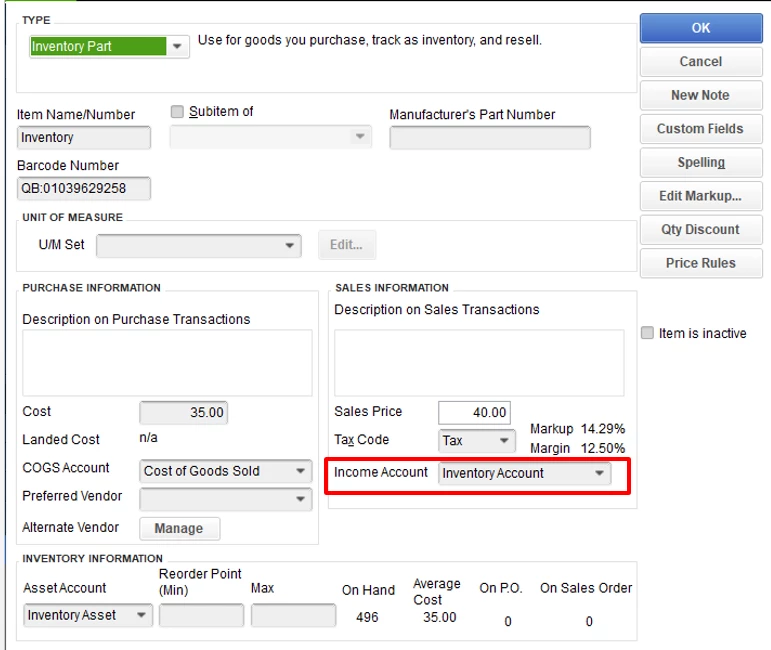
To ensure your accounts are accurate, you might want to check the items used or if the new line item (an INV) is mapped correctly.


Here's how:

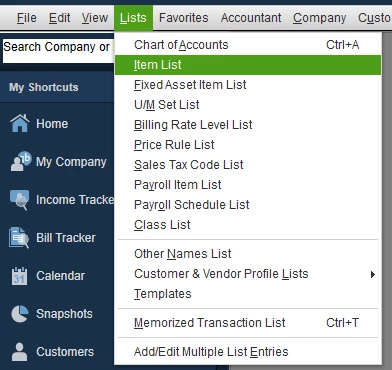
  1. Click Lists at the top menu bar and choose Item List.
  2. Look for the item used on the invoice and double-click the product to edit it.
  3. From Income Account, make sure to select the correct category (in my sample screenshot, I used an income account type). I'd suggest consulting with your accountant to help and guide you on what type of account to use.
  4. Once done, hit OK.


To know about more how inventory item works as well as steps on how to apply discounts to customer payments in QuickBooks Desktop, check out the following resources below:


If there's anything else you need, please let me know. I'd be more than willing to lend you a hand.

2 replies

May 26, 2022

Let me help you sort this out, nkastner.


Typically, a business sends an invoice to a client after they deliver the product or service. This will add a journal entry as a debit in the accounts receivable account and a credit in the sales account.


To ensure your accounts are accurate, you might want to check the items used or if the new line item (an INV) is mapped correctly.


Here's how:

  1. Click Lists at the top menu bar and choose Item List.
  2. Look for the item used on the invoice and double-click the product to edit it.
  3. From Income Account, make sure to select the correct category (in my sample screenshot, I used an income account type). I'd suggest consulting with your accountant to help and guide you on what type of account to use.
  4. Once done, hit OK.


To know about more how inventory item works as well as steps on how to apply discounts to customer payments in QuickBooks Desktop, check out the following resources below:


If there's anything else you need, please let me know. I'd be more than willing to lend you a hand.

nkastnerAuthor
May 27, 2022

That fixed the problem. Many thanks. 

Rainflurry
May 27, 2022

@nkastner


What item(s) is on the invoice?  Look at that item to make sure it isn't mapped to your bank account.  When you create an invoice, A/R increases and, if the item on the invoice is mapped to a bank account, it will decrease your bank account.

September 6, 2023

Oh man. That is the answer. I was going crazy on this. I had set up a new part to get rid of some inventory and did not set it up correctly. Thank you so much.

DHeraV
September 6, 2023

Hello there, @ChrisS67.


I'm grateful that you took the time to inform us that my colleagues' solutions were beneficial to you. I also commend you for implementing the suggestions and utilizing all available resources to arrive at your current solution.


As always, the Community is filled with experts who possess extensive knowledge about QuickBooks. So, if you require any assistance, feel free to reach out to us here. We're always delighted to support you on your journey to success. Best wishes for continued prosperity in your business!