November 1, 2021
Solved

Vendors reports

  • November 1, 2021
  • 1 reply
  • 0 views

I'm looking for a report that shows my top 20 vendors by amount spent

Best answer by RenjolynC

Welcome to the QuickBooks Community, jasonod.


I'd be happy to share a report that shows some info of what you're looking for.


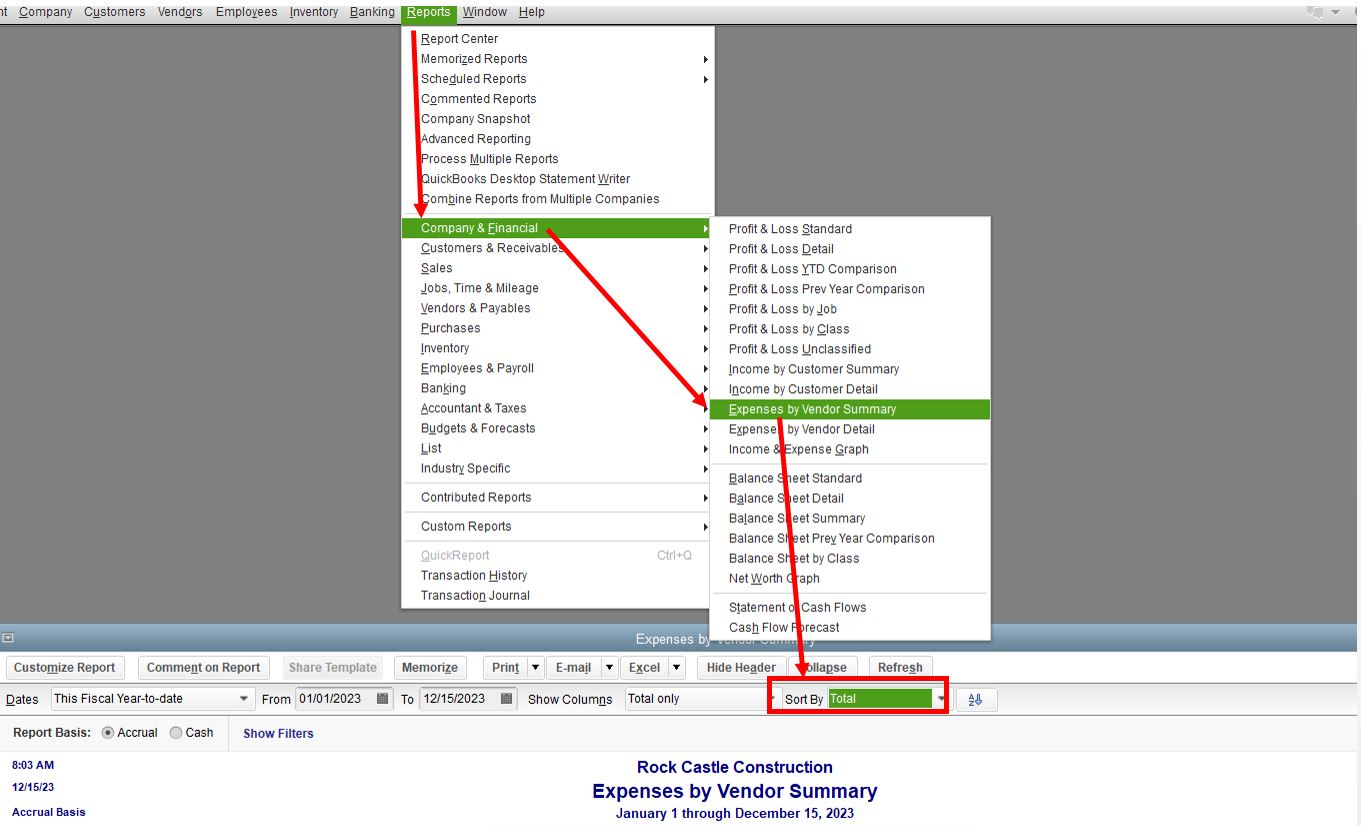
If you haven't run the Expenses by Vendor Summary report, let's start there. This report includes a list of vendors and the total amount you have paid for a specific time period. You can use this report to gauge what your largest expenses are.


Here's how:


  1. Go to Reports > Company & Financial > Expenses by Vendor Summary.
  2. From the Sort By drop-down, select Total.

I've got this sample screenshot for a visual reference:


To learn more about the different reports in QuickBooks Desktop and how you can customize them, please check out these articles:


If you have more questions about the reports or need help with other task in your account, please let me know in your reply. I'd be glad to help you out again. Have a good day ahead.

1 reply

RenjolynC
RenjolynCAnswer
November 2, 2021

Welcome to the QuickBooks Community, jasonod.


I'd be happy to share a report that shows some info of what you're looking for.


If you haven't run the Expenses by Vendor Summary report, let's start there. This report includes a list of vendors and the total amount you have paid for a specific time period. You can use this report to gauge what your largest expenses are.


Here's how:


  1. Go to Reports > Company & Financial > Expenses by Vendor Summary.
  2. From the Sort By drop-down, select Total.

I've got this sample screenshot for a visual reference:


To learn more about the different reports in QuickBooks Desktop and how you can customize them, please check out these articles:


If you have more questions about the reports or need help with other task in your account, please let me know in your reply. I'd be glad to help you out again. Have a good day ahead.

December 27, 2021

I find things on the Vendor Report that have no transactions at all for any date under that specific vendor.  How does the data get to the Vendor Report when there are no transactions?  This isn't happening with just 1 vendor.

Tori B
December 27, 2021

Hi there, @kmermel


Thanks for following the thread and sharing your concerns. 


Would you mind sharing a screenshot of your report and more details about how you have it customized? Please make sure to block out any sensitive data that's included in the report before sharing. This way, I can take a look and have a better understanding of how you currently have it set up. 


However, you can also contact our Technical Support Team so an agent can screen share to check out all your customizations, and if needed, the agent can help build the report as you see fit. 


You can use the link I've included below to connect with an agent. 


I'll be sure to keep an eye out for your reply and look forward to chatting with you soon. Take care!
