
EPANCHAM
June 17, 2020
Solved

What's the font name for "PAID" stamp on a paid invoice?

  • June 17, 2020
  • 1 reply
  • 0 views

On the paid invoice print to PDF, QuickBook will apply a "PAID" stamp with date on it. 
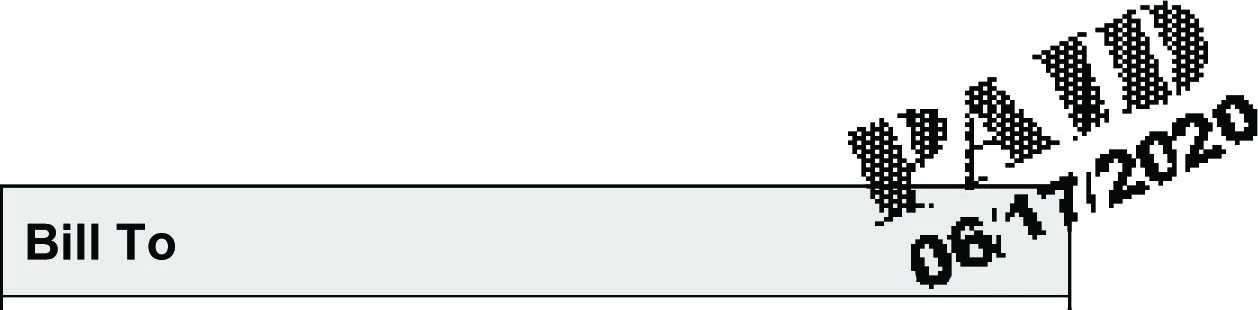


I'm just curious and wonder if anybody knows what's the font of that "PAID" stamp?


Thanks

Best answer by JoesemM

Thanks for getting back to us, @EPANCHAM.


The Paid stamp that will show when an invoice is Paid is just a picture and it's a built-in feature in QBDT.


In case, you'll want to remove the Paid stamp, you can edit the invoice template. I'll show you how:


  1. Go to the Lists menu and select Templates.
  2. Locate the invoice and double-click it.
  3. On the Company & Transaction Information section, remove the check for the Print Status Stamp.
  4. Click OK to save it.


Also, you can check out the articles that my colleagues provided on how to change the font of your paychecks and how to customize form templates.


I'm adding this article to in case you encounter any issues when customizing: Troubleshoot common issues when using and customizing templates.


If you have any follow up questions, don't hesitate to leave a comment below. I'm always here should you need further assistance. Enjoy your day!

1 reply

JenoP
June 17, 2020

Hi there, EPANCHAM.


It looks like QuickBooks is using the Stencil font style for the invoice's PAID stamps.


Let me also share some quick guides on how you can customize or change the font styles when printing transactions in QuickBooks:


I'll be around if you need anything else. 

EPANCHAM
EPANCHAMAuthor
June 17, 2020

Thanks a lot for the tip. I played with it a little bit. See screenshot below. The top part is the stamp copied from the printed pdf, bottom half is "Stencil" font, size 36.

As you can see, there are several differences:

1) the plaid pattern of the font 

2) The Stencil font looks "slimmer", it's taller and thinner. The stamp looks more chubby.

3) Most importantly, the letter "P" is a bit taller than the other 3 letters in the stamp, which is not see in Stencil font. Assuming all 4 letters are of the same font-size.


Could it be a special font, just made for QuickBook? Or perhaps these stamps are not text, just a picture?

JoesemM
JoesemMAnswer
June 18, 2020

Thanks for getting back to us, @EPANCHAM.


The Paid stamp that will show when an invoice is Paid is just a picture and it's a built-in feature in QBDT.


In case, you'll want to remove the Paid stamp, you can edit the invoice template. I'll show you how:


  1. Go to the Lists menu and select Templates.
  2. Locate the invoice and double-click it.
  3. On the Company & Transaction Information section, remove the check for the Print Status Stamp.
  4. Click OK to save it.


Also, you can check out the articles that my colleagues provided on how to change the font of your paychecks and how to customize form templates.


I'm adding this article to in case you encounter any issues when customizing: Troubleshoot common issues when using and customizing templates.


If you have any follow up questions, don't hesitate to leave a comment below. I'm always here should you need further assistance. Enjoy your day!

