
September 4, 2021
Solved

Where can I download an ACH form to pass to my customers to fill out?

  • September 4, 2021
  • 9 replies
  • 0 views
Original commenter did not share additional details

Best answer by AlcaeusF

Thanks,


This works great for recurring credit card charges but isn't there also a form for ACH payments?


Thanks again


Hi @jay87,


I appreciate you for getting back to us here in the Community. Allow me to chime in and assist you with the form you need for ACH payments in QuickBooks.


Yes, there's a form you can provide to your customers for accepting ACH payments and eChecks.  You can use this link: https://merchantcenter.intuit.com/wapweblet/ims-mp-help/en/echeck/echeck-authorization-form.html?_ga=2.110700742.2125351038.1630939993-1220392662.1625581348.


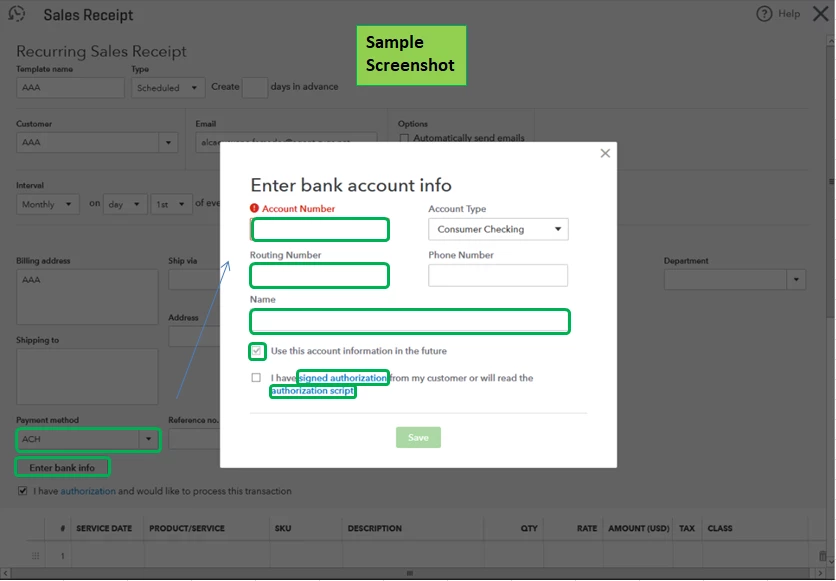
Also, you can access the form directly in QuickBooks Online. As long as you have Payments enabled, you have the option to click the Signed authorization hyperlink when adding bank accounts information for customers (see screenshot below).


I've attached an article for more details about Autopay, like how to set up the feature both for card and ACH transactions: Set up Autopay for recurring invoices in QuickBooks Online.


Leave a comment below if you have other concerns regarding processing customer payments in QuickBooks. The Community and I will be around to help you.

9 replies

September 4, 2021

Welcome to the Community, jay87.


I'd like to help and share what I know about sales forms that you can send to your customers.


You can send customer invoices through email from QuickBooks Online in just a few steps. Once your customer received the email, they can access the link and click Review and pay or Pay invoice button to open and pay for the invoice.


You just have to make sure to set both option to receive credit card or with an ACH bank transfer in QuickBooks.


Here's how:


  1. Click on New (+).
  2. Choose an Invoice or Send Invoice.
  3. Select the customer from the Customer dropdown.
  • Make sure their email address in the Email field.

    4. Go to the Online payments section.
    5. Review the payment options available.
    6. If you want to change the payment options, select Edit. Or select the checkbox for the options you want to make available.
    7. Click the Save and send button.


You can also check out this article to learn how you can personalize and add specific info to sales forms: Customize invoices, estimates, and sales receipts in QuickBooks Online.


Let me know if you still have other questions about sales forms. I'm always here to help. Have a great day!

jay87Author
September 4, 2021

Thanks but that does not answer my question. According to the online help I searched, if I contact customer service they are supposed to provide me with a form we can use. Is that not the case? 


If not, I suggest you update your online help topics.


Thanks


RenjolynC
September 4, 2021

Thanks for getting back here, jay87.


I'll share some steps where you can get the ACH form.


If you have QuickBooks Payments enabled and want to charge a customer repeatedly on a fixed schedule, you can download the authorization form by going to the recurring transaction page in the Merchant Services page. 


Here are the steps:


  1. Sign in to your Merchant Services account.
  2. Under the Recurring Payments sections, select the Create recurring payment link.

  3. In the Set Up Recurring Payment page, scroll down to the Payment Method section and click the Signed authorization link. The form will open on a new tab.

  4. Download or print the authorization form and send it to your customer.

I've got this sample screenshot for a visual reference:


For more information about QuickBooks Payments and recurring transactions, you can read these articles:


Please leave a reply below if you have more questions or you need help with other task in QuickBooks Online. I'll be around to help you out some more. Stay safe!

October 5, 2022

The link for this form is broken both in QBO and on the help site.

October 5, 2022

Hello there, @osubucknutz.


Thank you for letting us know that the authorization form link is broken. I've also checked it on my end, and it is unavailable. But don't worry, I'll make sure you can get a signed authorization form so you can process online payments for invoices.


Our product engineers may be updating the authorization form link that's why it isn't available within your QuickBooks account or from the article. In this case, I'd recommend contacting our QuickBooks Payments Team. They may have an alternative way to get a signed authorization form so you can start processing invoice payments online.


To reach them, you can use the chat link or call the phone number provided in this article: Contact Payments Support.


You may need more information about accepting electronic customer payments for online invoices. This article will guide you through the process: Take and process payments in QuickBooks Online with QuickBooks Payments.


Our Community forum is always open to help you again if you need more assistance processing payments in QuickBooks Online. Wishing you all the best!

dcaparaso
April 26, 2023

What a joke, 6 months later and they still haven't updated links.  


You're a technology company....

November 21, 2022

Chat with support today and they told me only:


I have checked in my tools here and it says as a workaround, customer needs to find an Auth form for ACH agreement from outside of QBO.
 
As your support today, I will do my part here to tag your account on the on going investigation with this investigation number: INV-74301.
November 23, 2022

The link to the form gives a 404 error and does not open

December 4, 2022

Why does Intuit have to make this so difficult that they can't just put the e-check authorization form online?  They aren't very business friendly with this. 

December 19, 2022

Did this get resolved, I am looking for the same form to send to a customer for payment via wire/ACH payment. 

January 11, 2023

Thanks for reaching out here in the Community, @RadicanFamily. I'll walk you through how to access the authorization form.


To access and complete the authorization form, you'll want to access your merchant service account and click the dropdown arrow button beside the Processing Tools section. To begin, these are the steps:


  1. Sign in to the Merchant Service Center.
  2. Select the Login & Merchant Accounts.
  3. Click the Processing Tools, and then in the Recurring Payment section, choose Create a Recurring Payment.
  4. On the right side of the screen, click the Complete authorization form hyperlink.


In addition, here's an article to help you handle ACH payments from your customers: Process an ACH bank transfer from a customer in QuickBooks Online.


I'd also recommend checking this page to learn more about bank deposits: Record and make bank deposits in QuickBooks Online.


The Community is open 24/7 if you have any additional QuickBooks-related concerns. I've got you covered, and I'll be happy to help you out again. Take care, and enjoy the rest of the day!

February 9, 2023

Feb 2023 and this is still not fixed. PATHETIC customer support

DivinaMercy_N
February 9, 2023

Hello there, @edh1. I want to ensure this will be taken care of.


Since you're still unable to access and complete the authorization form, I highly recommend reaching out to Merchant support team to further investigate the issue. They can also provide additional steps to help you resolve this. 


In the meantime, you can look for an authorization form for ACH agreement from outside of QBO as a workaround. 


I've attached this resource that you can use as a reference in processing an ACH bank transfer for your customer transactions: Process an ACH bank transfer from a customer in QuickBooks Online (QBO).


With QBO, its also easy to process electronic customer payments for online invoices and in-person sales. For detailed guide, please read this article: Take and process payments in QuickBooks Online with QuickBooks Payments. 


I'll be always here ready to provide assistance if you have any other concerns about managing customer payments in QBO. Have a great week ahead and stay safe. 

February 28, 2023

This is why I hate the community.  I have 10 extra web pages open all without the answer to the question.  This link use to work but it does not now.  The link now - wait for it - opens another community page!!!  Community needs to be updated by the same people who make the changes in QBO.  Links do not work. 

March 15, 2023

Found a link that works! (for Credit Cards only)

Go to your MERCHANT CENTER merchantcenter.intuit.com

From the Home tab, click "Create a recurring payment"

THEN click on the link for the authorization form!

March 16, 2023

Awesome, Thanks!

February 8, 2024

The link in QBO still doesn't work. It's February 2024 (3 years since original post!)

But the link from one of the suggested articles does. I'm pasting it here just in case someone needs it: https://eforms.com/download/2016/10/recurring-ACH-authorization-payment-form.pdf

Hope it continues to work.
