September 21, 2022
Solved

Who made an edit in a bill

  • September 21, 2022
  • 2 replies
  • 0 views

I am in a customer's bill. It has been paid. In the top right corner there is a "transaction tab." In that tab it has 'Last edit by...." How do I see what was edited by that person. 

Best answer by BigRedConsulting

RE: How do I see what was edited by that person. 

 

If the change is tracked (not all fields are), you can see it in the Audit Trail Report for the transaction. To quickly run it, click the little icon on the Transactions tab:
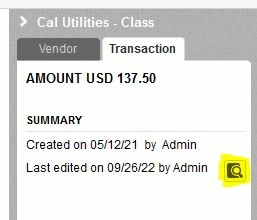
 

If you see multiple versions of the transaction on the report, then changes were tracked. If nothing is in bold font (indicating a change), try turning on additional columns that contain data for the transaction.

2 replies

September 21, 2022

Welcome to Community, apenalos. 


I'd be glad to show you how to check who made an edit to your bill in QuickBooks Desktop. 


You can pull up the Audit Trail report. This lists each accounting transaction and any additions, deletions, or modifications to your company file.


Here's how to open this report: 


1. Go to Reports at the top menu bar.
2. Select Accountant & Taxes.
3. Select Audit Trail.
4. Customize the dates on the report's page.
5. Click on Refresh to refresh the page.


I've added these screenshots for additional reference:


Also, you can visit this article if you want to customize reports: Customize reports in QuickBooks Desktop.


Keep me posted if you have follow-up questions about the audit trail report. We're always here to guide you. Have a great day!

BigRedConsulting
September 26, 2022

RE: How do I see what was edited by that person. 


If the change is tracked (not all fields are), you can see it in the Audit Trail Report for the transaction. To quickly run it, click the little icon on the Transactions tab:


If you see multiple versions of the transaction on the report, then changes were tracked. If nothing is in bold font (indicating a change), try turning on additional columns that contain data for the transaction.