Solved
Why don't I see the Selling, General, and Administrative (SG&A) Expense line in the Profit and Loss report?
Original commenter did not share additional details


I'm here to clear things out for you, Ruth_Arize.
When setting up your company, the system automatically enters default accounts depending on your business entity. Others are created when specific actions are taken or features are turned on in the settings.
I understand that there are certain expenses, such as rent and utilities, that are necessary but not directly tied to the product/services you offer. Usually, they'll fall under Selling, General, and Administrative (SG&A) costs and are reported on the profit and loss statement. For this one, you'll have to set it up manually. Here's how to do it:
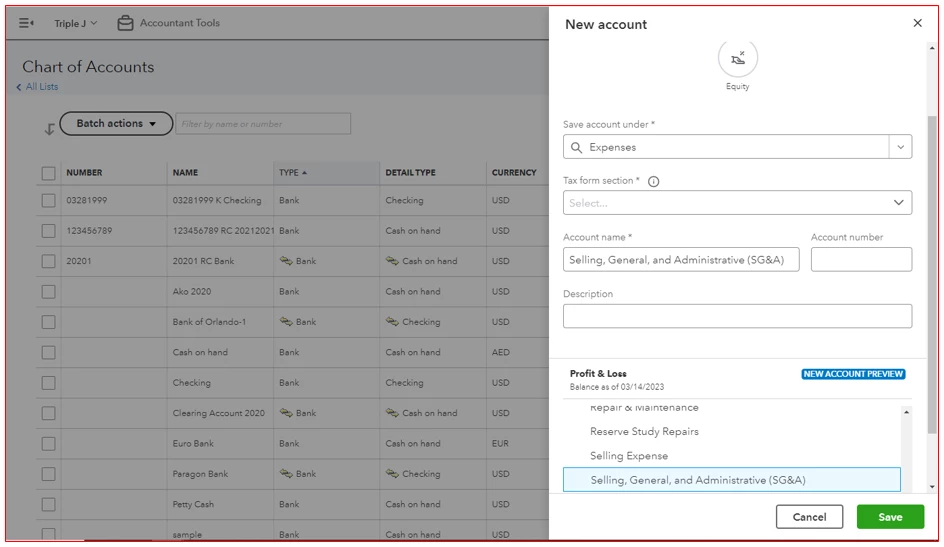
After that, use this category when entering your expense transactions. Finally, I recommend reading these articles to ensure that you'll get the most out of QuickBooks Online's reporting capabilities:
Keep me posted on how things turn out or if you have any other product concerns, Ruth_Arize. I'll make sure you're all set. Have a good one!
Enter your E-mail address. We'll send you an e-mail with instructions to reset your password.