April 17, 2019
Solved

Why is my Chart Of Accounts Balance Total empty/blank on all items?

  • April 17, 2019
  • 1 reply
  • 0 views

All of my items in the COA have nothing showing in the column Balance Total.  If I double click on the item, I see the balance.


Why isn't it showing on the page that lists all the COA.   The column is there for the Balance Total, but nothing shows


Thanks

Best answer by HoneyLynn_G

I'm here to make sure the Balance Total column will show the amounts, @543755.


Generally, the banks, Accounts Receivable, Other Current Asset, Fixed Asset, Accounts Payable, Credit Card, and Equity accounts must have amounts on the Balance Total column. Others not mentioned remains blank for they don't require an opening balance.


Since all of your items in the COA don't have amounts on the Balance Total column, let's try performing some troubleshooting steps. This is to verify if this is a data-related issue.


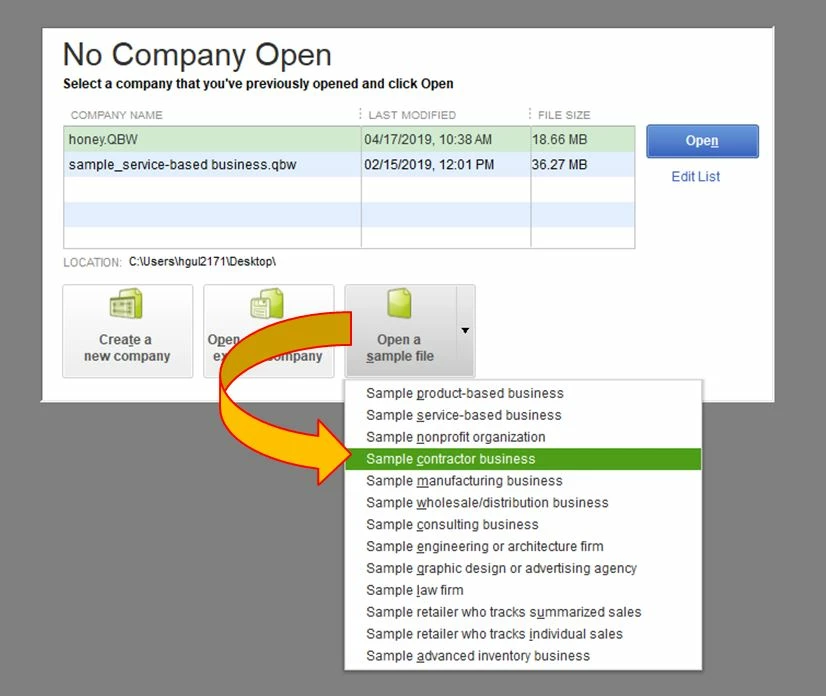
Let's begin with opening a sample file:

  1. Open your QuickBooks.
  2. Click the Open a sample file button.
  3. Select a company file.
  4. Once done, go back to your Chart of Accounts (Lists > Chart of Accounts).

If there are amounts on the Balance Total column, this means the data in your company file is damaged. What we need to do next is run the Verify/Rebuild tool.


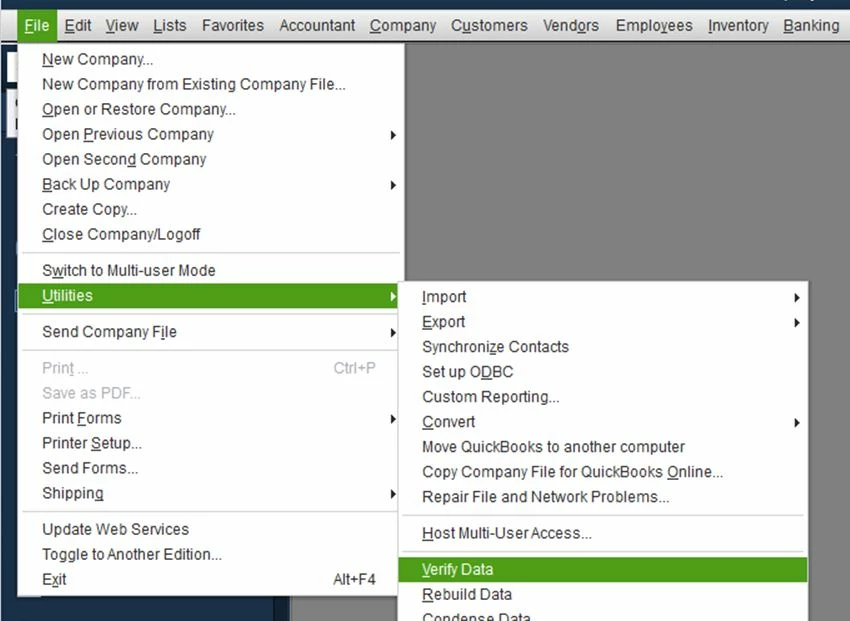
Here's how to verify data:

  1. On the top menu, click File.
  2. Choose Utilities.
  3. Select Verify Data.
  4. Click OK when you see the message, QuickBooks detected no problem with your data.
  5. If Verify finds an issue with your data, you'll be prompted to Rebuild Now or View Errors.
  6. Click Close or View Errors and take note of the specific error message.
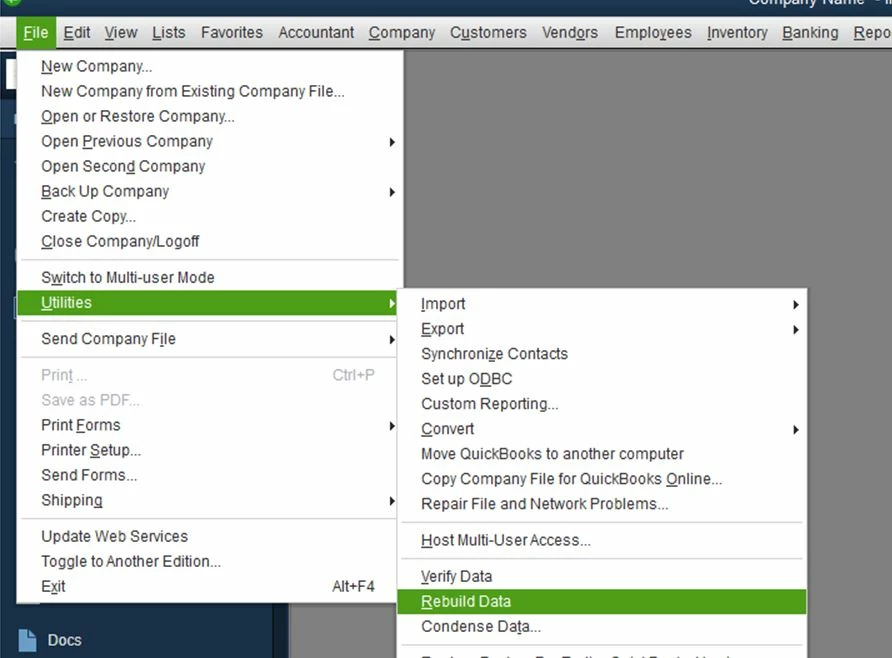
Here's how to rebuild data:

  1. On the top menu, click File.
  2. Choose Utilities.
  3. Select Verify Data.
  4. Click OK if you receive a prompt to back up your company file.
  5. Click OK when you get the message, Rebuild has completed and proceed to the next step.
  6. Run Verify Data again to make sure there's no error.
Please let me know how it goes or if you have any follow-up questions. I'll be here if you need further assistance. Just leave a comment below.


1 reply

HoneyLynn_G
April 17, 2019

I'm here to make sure the Balance Total column will show the amounts, @543755.


Generally, the banks, Accounts Receivable, Other Current Asset, Fixed Asset, Accounts Payable, Credit Card, and Equity accounts must have amounts on the Balance Total column. Others not mentioned remains blank for they don't require an opening balance.


Since all of your items in the COA don't have amounts on the Balance Total column, let's try performing some troubleshooting steps. This is to verify if this is a data-related issue.


Let's begin with opening a sample file:

  1. Open your QuickBooks.
  2. Click the Open a sample file button.
  3. Select a company file.
  4. Once done, go back to your Chart of Accounts (Lists > Chart of Accounts).

If there are amounts on the Balance Total column, this means the data in your company file is damaged. What we need to do next is run the Verify/Rebuild tool.


Here's how to verify data:

  1. On the top menu, click File.
  2. Choose Utilities.
  3. Select Verify Data.
  4. Click OK when you see the message, QuickBooks detected no problem with your data.
  5. If Verify finds an issue with your data, you'll be prompted to Rebuild Now or View Errors.
  6. Click Close or View Errors and take note of the specific error message.

Here's how to rebuild data:

  1. On the top menu, click File.
  2. Choose Utilities.
  3. Select Verify Data.
  4. Click OK if you receive a prompt to back up your company file.
  5. Click OK when you get the message, Rebuild has completed and proceed to the next step.
  6. Run Verify Data again to make sure there's no error.

Please let me know how it goes or if you have any follow-up questions. I'll be here if you need further assistance. Just leave a comment below.

April 17, 2019

Thanks, I was expecting to see a # on every line item not just the ones you mentioned.  So thank you for explaining that!!

vpcontroller
April 17, 2019

@543755 

@HoneyLynn_G 


In the Chart of Accounts, "Balance Total" column shown is for Balance Sheets accounts only. But in QuickBooks Desktop, you can customize the COA and show "Balance" column for the account list.
Just right-click on any one of your accounts > Select "Customize Columns" > Select "Balance" from the Available Columns > Click ADD and OK. See screenshot below for reference.