
Solved
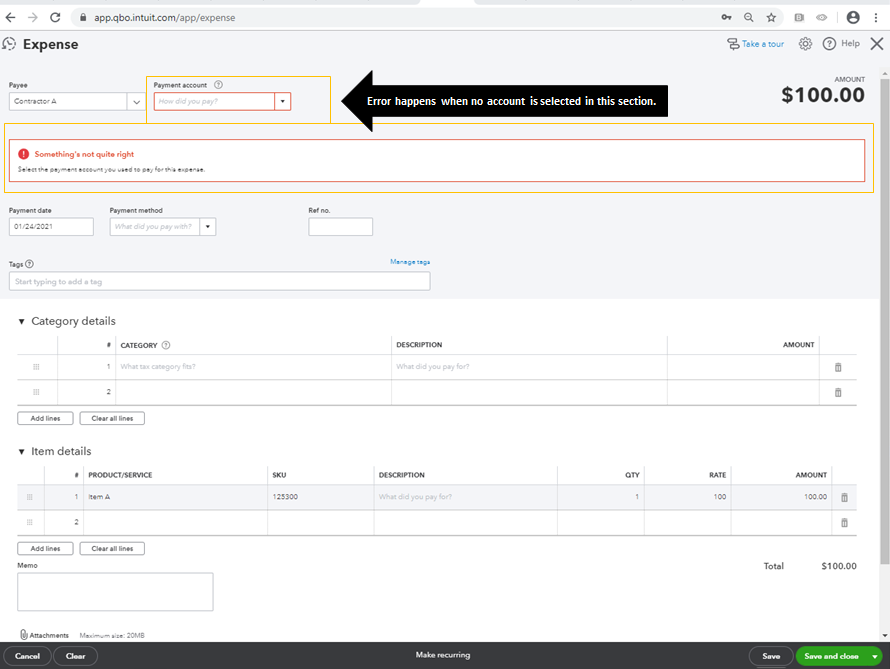
Why is QB telling me to pick an account when I try to add an expense? I made a purchase by CC and it needs to be itemized, I Picked the CC but System is not allowing me.
Original commenter did not share additional details


Hi there, @Ru-lou.
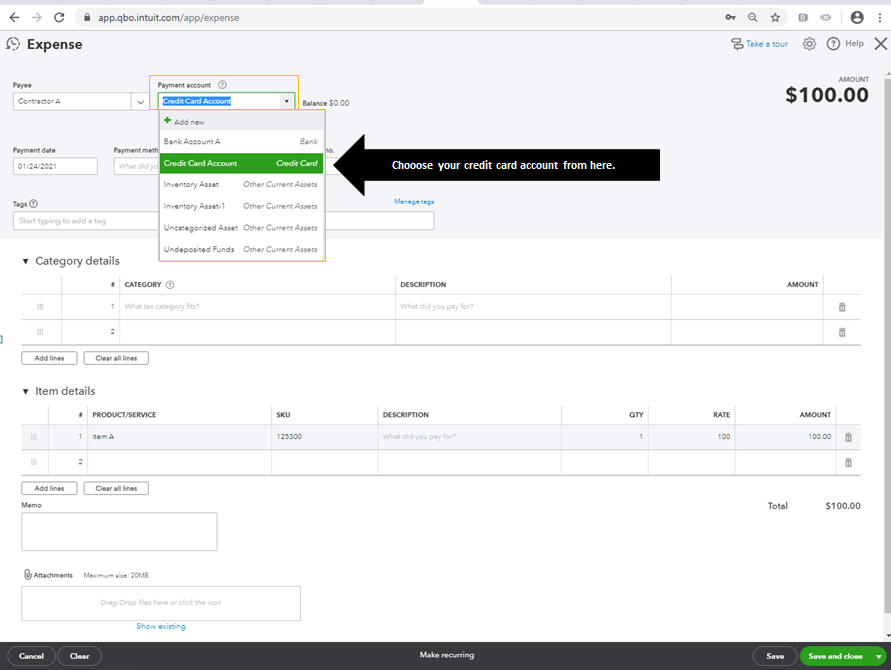
Welcome to the Community page! Yes, the error happens when there is no account selected under the Payment account section. When creating an expense, you need to pick a bank or credit card account to where you want to get the funds on that certain transaction. I can guide you on how.
I've added these screenshots for your visual references.
Just in case your credit card isn't added to your chart of accounts, you can use this link for the instructions on how to set it up: Add an account to your chart of accounts in QuickBooks Online.
Moreover, here are some of our help articles which you can read more about managing expenses and other transactions in QuickBooks Online:
I'm more than happy to help you with recording your expenses and other vendor or customer transactions in QuickBooks. If you need additional help, please let me know by adding a comment below. I'm always here to help. Have a good one!
Enter your E-mail address. We'll send you an e-mail with instructions to reset your password.