September 24, 2023
Solved

With QBO Adv., I'm creating a Statement of Financial Activity (non-profit). How do I change the default Section Title from "NET REVENUE" to "CHANGE IN NET ASSETS"?

  • September 24, 2023
  • 1 reply
  • 0 views
Original commenter did not share additional details

Best answer by mhg604

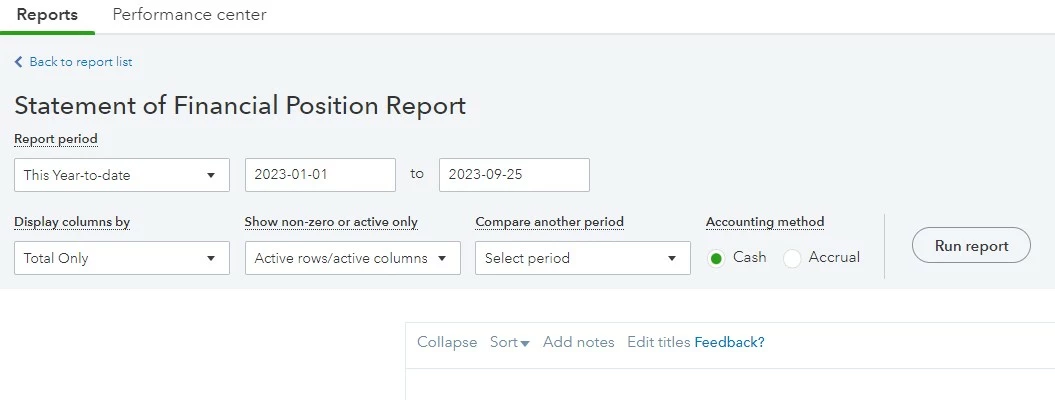
Glad to say that I won't need the workaround. I found the "Edit Titles" popout link to the right of the 

Collapse     Sort     Add notes     Edit titles


1 reply

September 24, 2023

I can see this is useful in your everyday task, @mhg604. I can share a workaround so you can change the Net Revenue to Net Assets under the Statement of Financial activity in QuickBooks Online.


We export the report as a workaround. Once done, you can modify the file from there. Doing this will allow you to edit all the data in the Excel file. 


Here's how:


  1. Go to Business overview and select Reports.
  2. Search for and select the report you want to export.
  3. At the top of the report file, select the Export icon. Then choose Export to Excel.
  4. Save the file somewhere you can easily find, like your Downloads folder.


Moreover, if you're experiencing missing data when opening a report in Excel, it's likely because the file is in protected view. To view the full report, you'll need to select Enable Editing in Excel. 


Alternatively, you can switch between the two views anytime without affecting your accounts or data. It allows you to choose the view that best suits your needs. See this reference: Switch between Business and Accountant view in QuickBooks Online.


I'm here to help you with any questions or concerns under the Reports section. Feel free to ask me anything, and I'll do my best to provide you with a helpful response.

mhg604AuthorAnswer
September 25, 2023

Glad to say that I won't need the workaround. I found the "Edit Titles" popout link to the right of the 

Collapse     Sort     Add notes     Edit titles


September 25, 2023

Hi there, @mhg604.


Thanks for getting back here in the thread and for letting us know that you're able to get through your current situation. The Community Team is always ready to provide assistance if you have any additional QuickBooks-related concerns. Feel free to comment below or visit us anytime so we can help you as soon as possible.


Take care, and have a good one!