Solved
With the new invoice format, what settings are needed to display past due amounts and payments received since the last invoice?
I need to do this in both new invoices and recurring invoice templates.


Thanks for the reply on the thread, kpstraus@garnetc.
The payment received and past due amounts can still be included in the new format of the invoice. If you want to be able to display it on the invoice. Just follow the steps provided.
Here's how:
For your visual, I'll attach a screenshot so that you will have a guide.
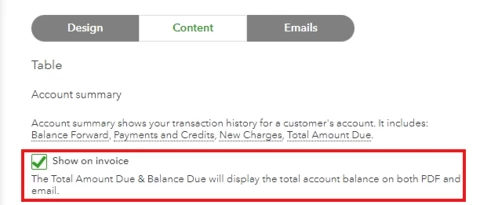
For the steps provided above provided by my colleague, that would be another workaround.
I will include this article so that you will have a guide on seeing what's new with estimates and invoices in QuickBooks Online.
You can always come here in the Community if you're experiencing hurdles in your account. Just remember, I'll jump right into this thread to assist you further. Be safe.
Enter your E-mail address. We'll send you an e-mail with instructions to reset your password.