

October 29, 2019
Solved

Working with Gift Cards and Sales Receipts

  • October 29, 2019
  • 1 reply
  • 0 views

Hello,


I do online sales and receive payment immediately for my sales. So for the past 4 years I simply create sales receipts and as part of this I record my COGS along with the Sales Receipt, as my online vendor takes their cut before sending me my profit.

I just started offering Gift Cards and while I know this is a liability and have set it up as a payment option, there are times that this yields a negative for the sale. For instance, I have a client that spends $55 on goods, they purchased a $50 gift card that game the 10% off and free shipping with the gift card. So the net effect is $0.00. But since I offered Free Shipping, my vendor charges me for the shipping cost - $4.95. Add in a credit card processing fee, my vendor's take, production costs and shipping, and I'm in the hole -$8.00. My cost is substantially less than what I charge so I'm making money, but I need to reflect this in QB.

So is there a better way for me to track my processing expenses than attached to a Sales Receipt?
Best answer by RaymondJayO

Yes, you can, @Prespares


You'll have to put the sales receipt into the Undeposited Funds account. This account holds the transaction before you record a deposit. It will automatically appear in the Bank Deposit window. This helps you match the operating expenses back to the income on the transaction. Let me guide you how. 

  1. Go to Customers from the top menu. 
  2. Select the customer's name. 
  3. Find the sales receipt you just created. 
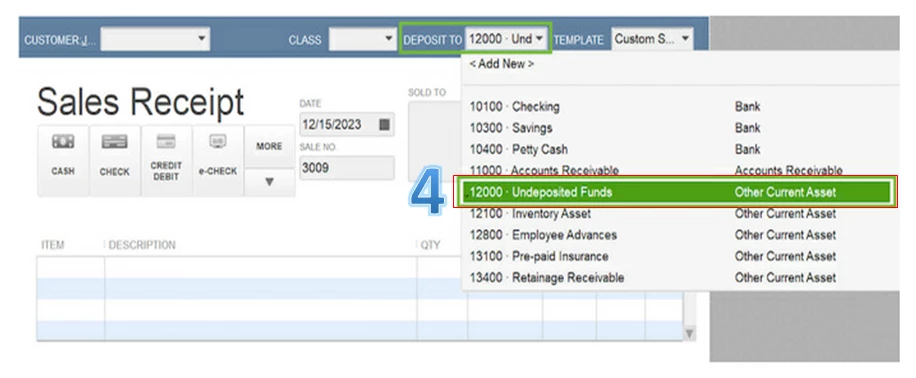
  4. From the Deposit to drop-down, select Undeposited Funds.
  5. Enter any necessary changes. 
  6. Click Save & Close

The screenshot below shows you the fourth step. 


To create a bank deposit: 

  1. Go to Banking from the top menu. 
  2. Select Make Deposits
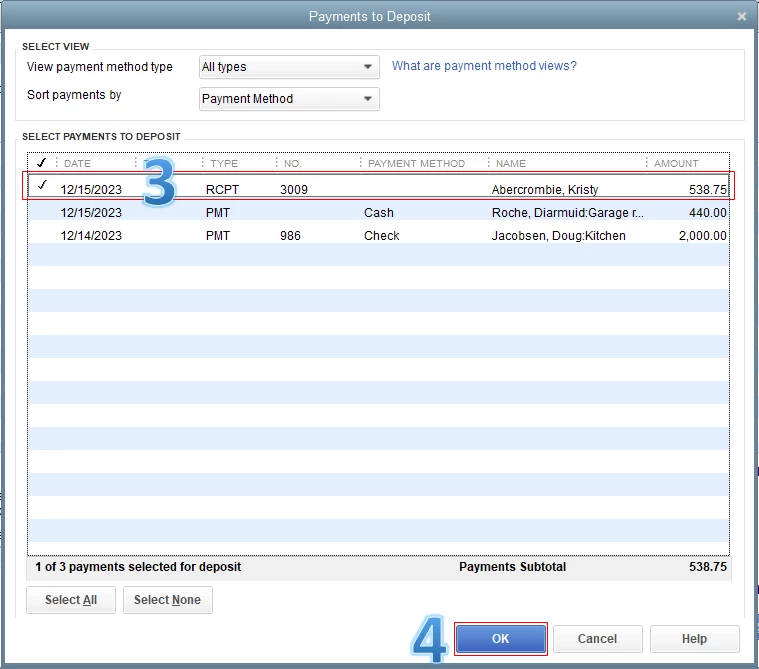
  3. In the Payments to Deposit window, choose the sales receipt.
  4. Click OK.
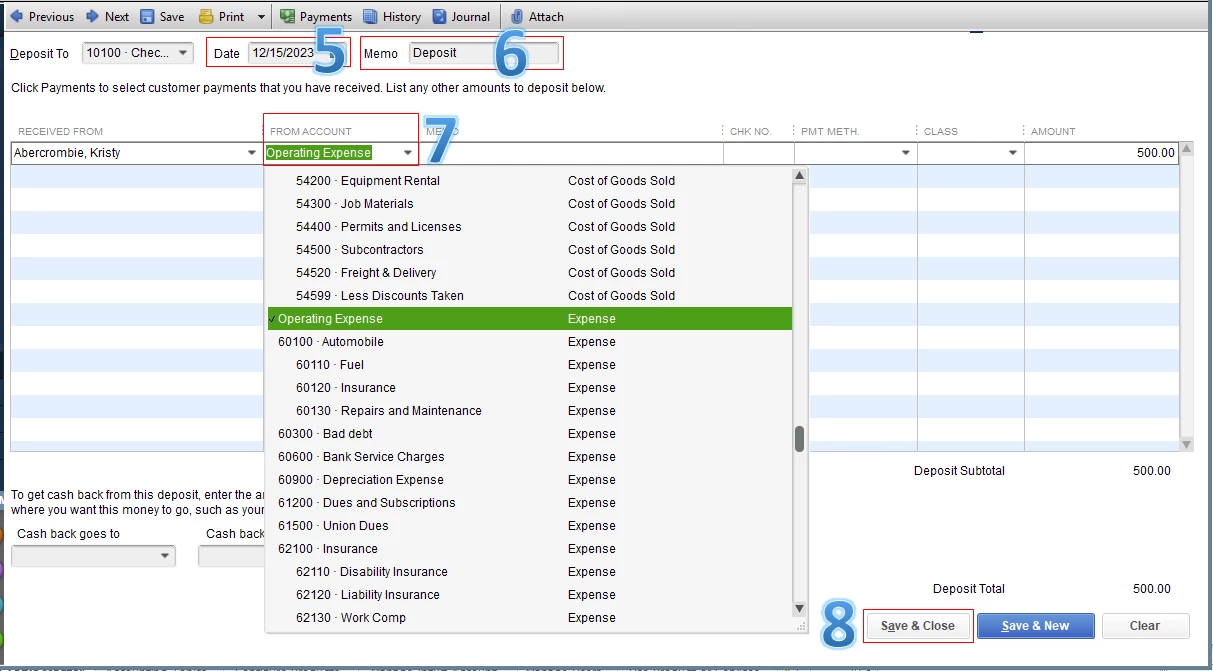
  5. Enter the date for the deposit.
  6. Add a memo as needed.
  7. In the From Account drop-down menu, select the Operating Expenses account. 
  8. Click Save & Close.

The screenshot below shows you the last six steps. 


You can visit this article: Deposit Payments. It covers all the steps from putting the transactions into the Undeposited Funds account, making a deposit, and running the QuickReport: Undeposited Funds


If you're on a cash basis when running your financial reports, a sales receipt is one of the most important money in transactions. However, if you're on an accrual accounting method, you can use Accounts Receivable (A/R) workflow in the program. To learn more about its different workflows, see this article: Manage A/R transactions


I'm here anytime you have other concerns. Have a great day, @Prespares

1 reply

Rustler
October 29, 2019

online vendor fees are not COGS, the fees are just an operating expense.
COGS is the cost of the inventory item you sell.

Expenses do not belong on the sales receipt. the vendor fee, shipping expense, etc are entered separately as operating expenses.

If the customer pays in advance for shipping, that is income, and should be on the sales receipt posting to an income account called something like pre-paid shipping.

PresparesAuthor
October 29, 2019

Thanks, but I'm not paying a bill. The expenses are recorded immediately and deducted from my sale. So what is deposited into my checking account matches what I record on my Sales Receipt. Can Operating Expenses be tied back to the income on Sales Receipt?

October 29, 2019

Yes, you can, @Prespares


You'll have to put the sales receipt into the Undeposited Funds account. This account holds the transaction before you record a deposit. It will automatically appear in the Bank Deposit window. This helps you match the operating expenses back to the income on the transaction. Let me guide you how. 

  1. Go to Customers from the top menu. 
  2. Select the customer's name. 
  3. Find the sales receipt you just created. 
  4. From the Deposit to drop-down, select Undeposited Funds.
  5. Enter any necessary changes. 
  6. Click Save & Close

The screenshot below shows you the fourth step. 


To create a bank deposit: 

  1. Go to Banking from the top menu. 
  2. Select Make Deposits
  3. In the Payments to Deposit window, choose the sales receipt.
  4. Click OK.
  5. Enter the date for the deposit.
  6. Add a memo as needed.
  7. In the From Account drop-down menu, select the Operating Expenses account. 
  8. Click Save & Close.

The screenshot below shows you the last six steps. 


You can visit this article: Deposit Payments. It covers all the steps from putting the transactions into the Undeposited Funds account, making a deposit, and running the QuickReport: Undeposited Funds


If you're on a cash basis when running your financial reports, a sales receipt is one of the most important money in transactions. However, if you're on an accrual accounting method, you can use Accounts Receivable (A/R) workflow in the program. To learn more about its different workflows, see this article: Manage A/R transactions


I'm here anytime you have other concerns. Have a great day, @Prespares