January 11, 2022
Solved

Quickbooks Desktop, customer statement, description line customization

  • January 11, 2022
  • 1 reply
  • 0 views

I am using 2021 Quickbook Desktop Premier version. When I prepare a customer statement, the description line includes the "memo" line of each invoice. Under "customer/create statement/Select additional options" I do not have any checkboxes turned on for any additional information.

With memo line included, my statements are 10 pages long as we do include  lots of details in the memo line. Is there any way to exclude memo line from the description? All I want is invoice #, and a due date.


Thank you


Best answer by Jen_D

Thanks for sharing your insights about the statements in QuickBooks Desktop, Anna.


We want to make sure your suggestion reaches our developers. At the moment, there isn't a setting in the statement template to exclude the memos of the transactions. We recognize the need to get this taken care of, but for now the only available workaround is removing the Description column.


In the meantime, you can send a product request for this concern to our developers. They go through a wide range of feedback and navigate a path forward towards accessibility leading.


Their goal is to be purposeful and thorough with the enhancements and product updates released in the program. Which is the reason why they welcome product requests directly from our customers. For now, we can't provide the turnaround time if they will add additional program preferences since they work on product enhancements internally.


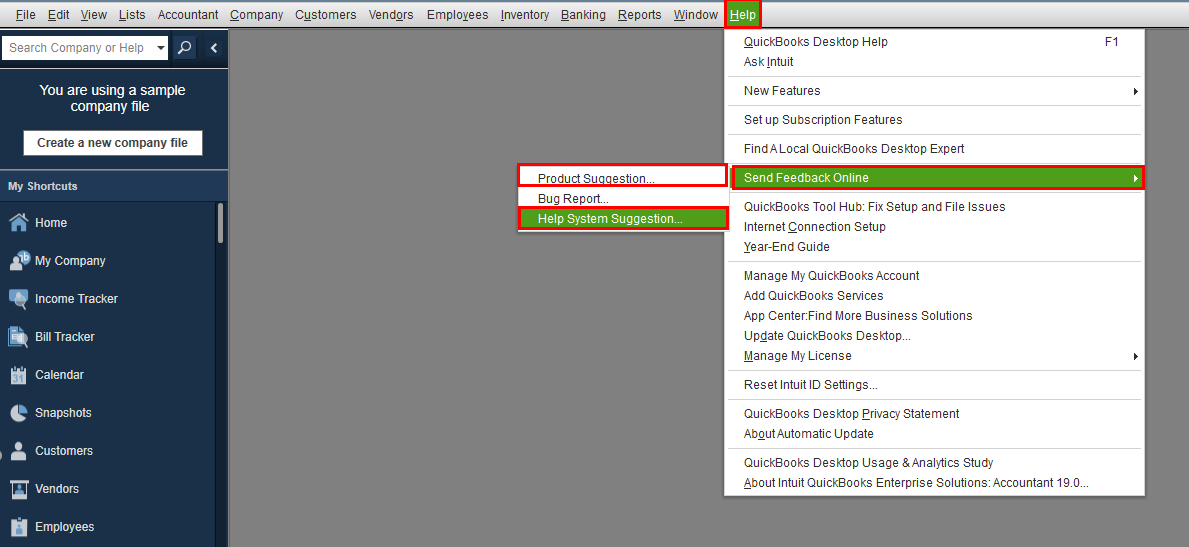
If you have any product suggestions to our developers about our report preferences, go to the Help menu and select Send Feedback Online.


If you have any questions or need further help with QuickBooks, visit us anytime. You can also mention my name on your posts, and I'll be more than happy to help. Have a nice day!


1 reply

January 12, 2022

Hello Anna325, 


Congrats on your first post in the Community. QuickBooks Desktop enables you to keep track of your income and expenses with ease. I'll be glad to point you in the right direction so you can achieve your goals and get back to doing what you love. 


Based on what you've described, I encourage you to check out the customization options provided in this helpful article here. In case you need additional support as you go through the article, I recommend getting in touch with our phone support team so they can assist you further. You can contact our support team by dialing 1-833-317-2226. To find out more about our hours of operation, check out this link here. Feel free to keep me posted on how you make out. I'll be on standby.

Anna325Author
January 14, 2022

Thank you for your answer, however, the answer was not relevant. My question was very specific to the "memo" line being included under the "description" column in the receivable statement. Unfortunately, the link was not helpful.

Jen_D
Jen_DAnswer
January 14, 2022

Thanks for sharing your insights about the statements in QuickBooks Desktop, Anna.


We want to make sure your suggestion reaches our developers. At the moment, there isn't a setting in the statement template to exclude the memos of the transactions. We recognize the need to get this taken care of, but for now the only available workaround is removing the Description column.


In the meantime, you can send a product request for this concern to our developers. They go through a wide range of feedback and navigate a path forward towards accessibility leading.


Their goal is to be purposeful and thorough with the enhancements and product updates released in the program. Which is the reason why they welcome product requests directly from our customers. For now, we can't provide the turnaround time if they will add additional program preferences since they work on product enhancements internally.


If you have any product suggestions to our developers about our report preferences, go to the Help menu and select Send Feedback Online.


If you have any questions or need further help with QuickBooks, visit us anytime. You can also mention my name on your posts, and I'll be more than happy to help. Have a nice day!