Thank you for your prompt response, Payroll4InsightSS. I truly understand how crucial it is to file and pay all your returns in accordance with the state's compliance regulations. Together, let’s take a closer look at the content of the Payroll Tax and Wage Summary report. This will ensure you have all the necessary information for submitting the correct CA WH/UI DE9 and DE9C taxes.
With QuickBooks Online Payroll (QBOP), you have the flexibility to choose how your payroll taxes and filings are handled. If you enable the Automate Taxes and Forms option in the Payroll Settings, we'll automatically pay your taxes and file your forms for you. However, if you prefer to be more hands-on, selecting the I’ll Initiate Payments and Filings Using QuickBooks option requires you to electronically file your taxes manually within the platform.
Since you need to file and pay last year's CA WH/UI DE9 and DE9C, this will need to be done directly with your state agency. To make the process easier, consider reaching out to a tax expert who can assist you in inputting the data you've gathered in QuickBooks. Their expertise can help ensure that everything is filed accurately and on time!
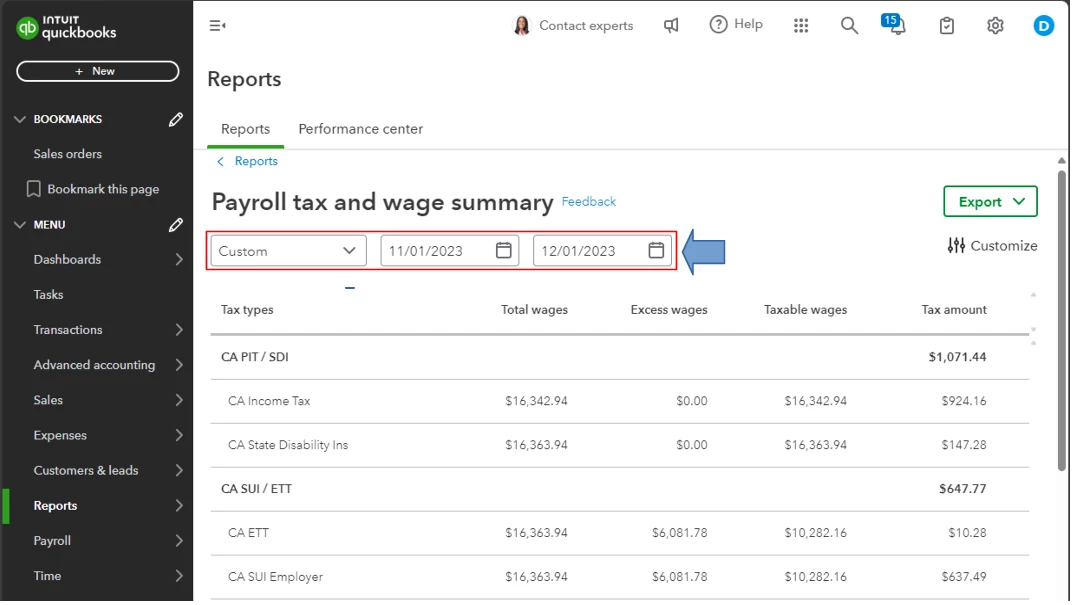
On the other hand, the Payroll Tax and Wage Summary report offers essential details, including the tax amount, total, excess, and taxable wages categorized by tax type. To ensure your filed numbers for the specific quarter align with the information provided in the report, please double-check that you’ve filtered the correct date range at the top. This will help you maintain accuracy in your filings. Please see the screenshot below for your reference.
Moreover, you can also pull up the Payroll Tax Liability report to know how much payroll tax you need to pay and how much you’ve already paid on a specific period. To do this, follow these steps:
- Go to the Reports menu and select the Standard tab.
- Type Payroll Tax Liability in the Find report by name field and click it to open its content.
- Set the Date range from the dropdown menu.
- Customize if necessary.
- Finally, click Run Report.
Additionally, are you interested in accessing your previously filed tax forms and payments in QuickBooks? Being able to review this information can be really beneficial for your financial planning. If you'd like to proceed, you can find a step-by-step guide in this article: View tax forms and payments.
Having gone through our discussion, you should now be well-equipped to gather the necessary data to file and pay your Q3 2023 CA WH/UI DE9 & DE9C. If you have any further questions or concerns regarding the steps we covered, please don’t hesitate to reach out. I'm always here to support you and ensure your success!

