Solved
Can I delete a Sales tax payment and recreate it?
Can I delete sales tax payments in Quickbooks Desktop and recreate it with the adjustments that matches what my tax agency says it should be?


Can I delete sales tax payments in Quickbooks Desktop and recreate it with the adjustments that matches what my tax agency says it should be?
Hello, LILE.
Yes, you can delete the sales tax payments from QuickBooks Desktop. There are two ways to do this and I'm happy to show you the process for each one.
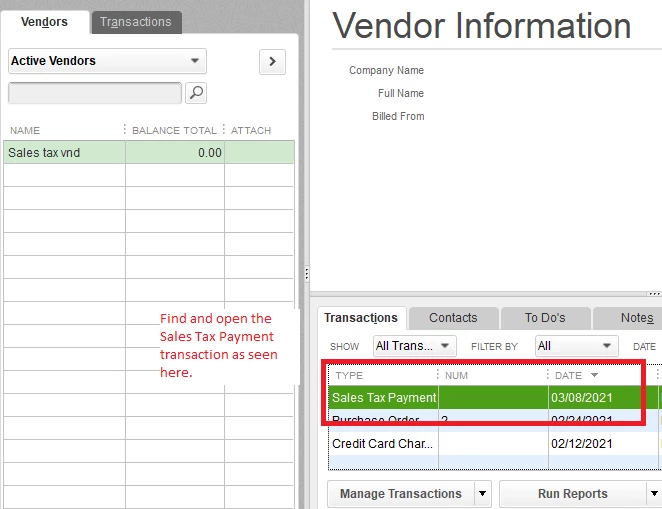
The first method is to go to the vendor's profile (in charge of collecting your sales taxes) and delete the tax payments from there. Here's how:
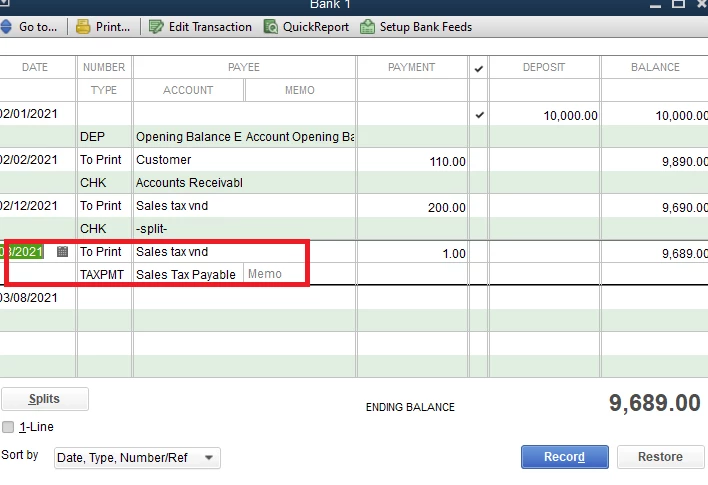
The second method is to go to your Chart of Accounts and open the bank register where you paid the taxes from. Here's how:
We have an article series about handling Sales Taxes in QuickBooks Desktop. Check it out if you need a bit of help managing your sales taxes, especially the adjustments: Set up sales tax in QuickBooks Desktop.
Also, you might want to reach out to an accountant if you want to delete the tax payments in a closed accounting period. Doing this will affect your books, and they have an idea on how to handle the corrections.
You're welcome to browse other QuickBooks Desktop articles in our articles list page. I'm sure they'll help you record new transactions, run reports or even handle tax corrections.
I'm still up to answer any other questions you might have for QuickBooks. Just add the details here and I'll see what I can do for you. I'll see you around again.
Enter your E-mail address. We'll send you an e-mail with instructions to reset your password.