April 27, 2019
Solved

How to see all past sales tax payments?

  • April 27, 2019
  • 4 replies
  • 0 views

Is there a way to all past sales tax payments?


It gives me option to see only current or previous year:

 

And under Recent Payments it shows only the last 6 payments.


Thank you!



Best answer by Charies_M

Thank you, @JanyRoseB .


I'm still missing something. How do I get to the screen you showed in your post?


When I click on Taxes, this is what I see. Where exactly do I click?
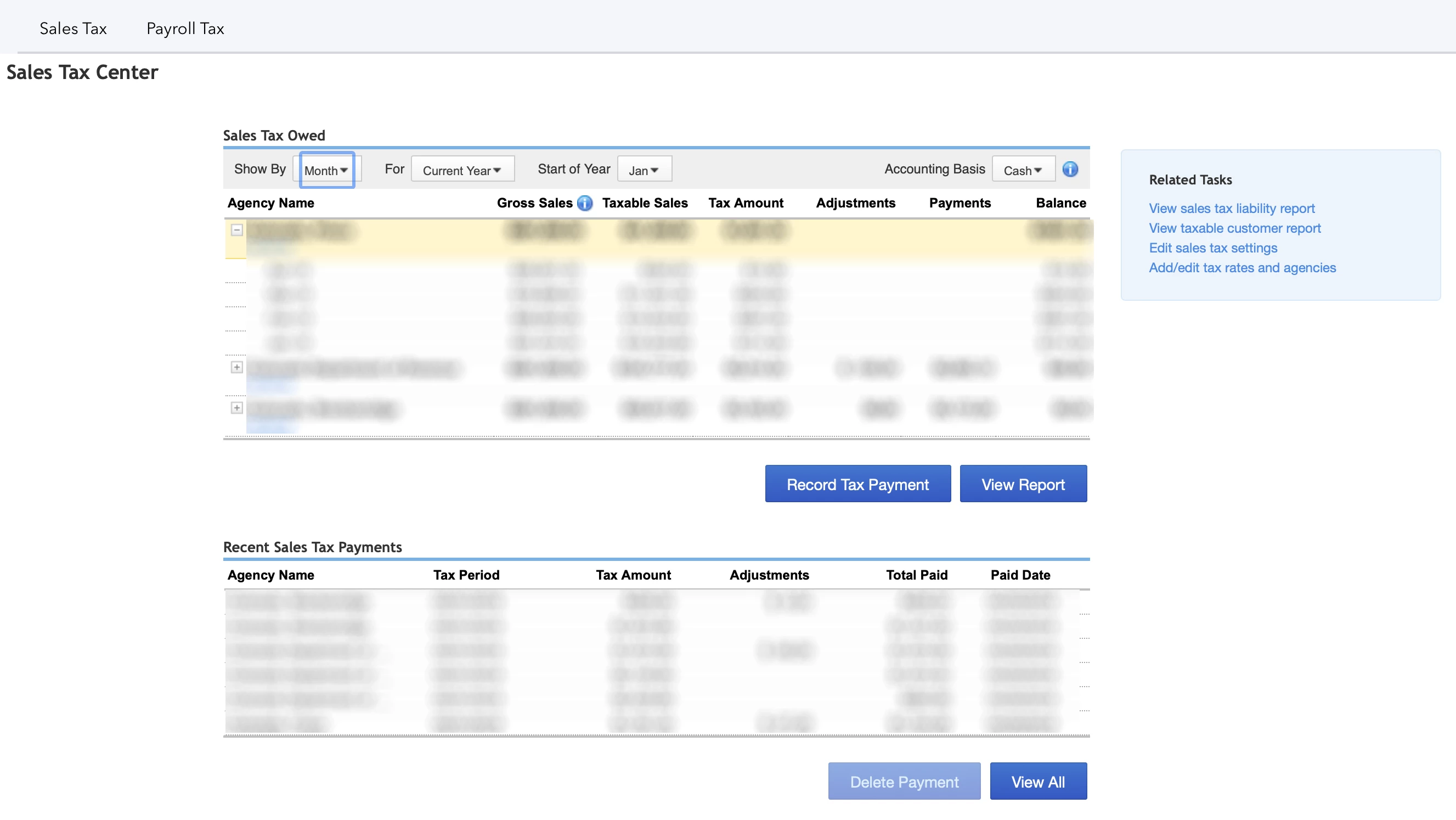


Hello there, Daniel01.


Allow me to join this thread and continue to guide you on deleting sales tax payment in QuickBooks Desktop.


The steps provided by my colleague JanyRose should help you delete sales tax payment. 


Here's  how:

  1. Go to Taxes.
  2. From the Sales Tax, click View All.
  3. The Transaction Detail by Account Report, will open, choose the payment.
  4. Click Delete.

The following screenshots will serve as your visual guide on how to delete sales tax payment.


There you have it. Don't hesitate to leave a comment if there's anything else you need. I'd be glad to help you out.

4 replies

April 29, 2019

I can help you see all past sales tax payments, Daniel01.


All you have to do is follow these steps:

  1. Click Taxes, and then Sales Tax at the top.
  2. Under Recent Sales Tax Payments, then click View All.
  3. The Transaction Detail report will open that lists all your sales tax payments. Just click Customize to adjust the date range. 
  4. Click Run report.

To view all sales tax owed, you can click the View Report button.


Please check out this helpful article for more information: Manage sales tax payments.


If you any further concerns about sales tax, please don't hesitate to leave a comment below.


Daniel01Author
April 29, 2019

Thank you, @ShiellaGraceA .


I guess what I'm trying to figure out is how to delete a payment that is not on the list of recent payments. Recent payments show last 6 and I think I need to delete the 7th or 8th payment.


When I click on View All, it shows me Transaction Details but doesn't give me the option to delete the payment - or at least I can't see it...

April 29, 2019

Thanks for getting back to the QuickBooks Community, @Daniel01.


Allow me to step in and help guide you on how to delete a sales tax payment in QuickBooks Online (QBO). 


To do this, here's how:

  1. Click Taxes from the left menu.
  2. Select the Tax Agency for which you wish to delete a Sales Tax Payment.
  3. Click the Payments tab and locate the Sales Tax Payment you wish to delete.
  4. In the Action column, select the drop-down arrow and choose Delete.

For additional reference. you can check this article: How do I delete a sales tax payment?.


The other option is, you can locate the payment on the Chart of Accounts and look for the account you used for the state tax payment. From there, select the View Payment option and click Delete


This will get you on the right track. Fill me in if you have any other questions about deleting a sales tax payment. I'll be around to help you out. Wishing you and your business continued success. 

March 10, 2021

How can I see past sale tax payments with the new section of taxes. It only shows me from a year back from march to current but not January or February.


March 10, 2021

Hi, mprtwa. 


Welcome to the Community. Let's go to the Sales Tax tab and click the View All and you'll be routed to Transaction Detail by Account. From there, adjust the Report period to give you the specific month you'll like to view your sales tax payments. 


You might also want to browse these articles to know more about Sales Tax. 


Don't hesitate to comment down below if you have other questions. I'll be happy to help you. Have a nice day and stay safe!

May 11, 2021

Thank you for responding in this thread, Dave S1.


Unfortunately those steps provided above are intended for QuickBooks Online.


However, you can run a sales tax report in QuickBooks Desktop for Mac that shows the data you need.


Here's how:


  1. Select Reports.
  2. Click on Vendors & Payables.
  3. Choose Sales Tax Liability.


You can also check these articles that'll surely help in paying and reviewing sales tax in QuickBooks Desktop for Mac:


Let me know if you still have questions and clarifications about sales tax. I'll be here to help. Have a great week!

December 23, 2021

This answer does not apply to Quickbooks Online

December 23, 2021

Thanks for joining this thread, usercuminotto.


I’m here to help run a report that shows all previous tax payments in QuickBooks Online (QBO). We’ll have to open the Transaction Detail by Account report and customize it. Let me guide you on how to build it.


Here’s how:


  1. In QBO, tap the Reports menu on the left panel and enter Transaction Detail by Account in the search field.
  2. Press the Report period drop-down to set the correct date range.
  3. Click the Customize button in the upper right to open the Customize report window.
  4. Navigate to the Filter section and tick the box for Transaction Type to select Tax Payment.
  5. Choose Run report to apply the changes.


This resource contains instructions on how to personalize the data and layout of your reports: Customize reports in QuickBooks Online. From there, you’ll learn about sharing custom statements, automating one, and exporting it to Excel.


Additionally, the links below provide information about the Automated Sales Tax feature. These resources outline the complete steps on how to perform the following:


Feel free to let me know if you still need further assistance with running the sales tax payments report. I’ll get back to help and make sure this is taken care of for you. Have a great rest of your day.
