December 5, 2023
Solved

I need help setting up local county and city payroll tax withholding. My employees work at different addresses sometimes in the county and sometimes in the city.

  • December 5, 2023
  • 1 reply
  • 0 views
The way I have it set up now, it only takes out city taxes.
I don't understand how it determines when they are in the county and when they are in the city jurisdiction.
Best answer by CamelleT

I'll guide you on how we can set up and manage payroll for your employees who work at a different location every day, faith.


QuickBooks doesn't have a direct way of handling payroll for a roaming employee since having multiple state unemployment and local withholding on a single paycheck or tax filings may cause issues with state tax forms. For now, I suggest sending feedback about this. Here's how:


  1.  At the upper right corner, click the Gear icon.
  2. Under the Profile, select Feedback.
  3. Enter your comments or product suggestions and hit Next to submit feedback.

Moreover, I can share a workaround on how you can track and run payroll for these types of employees. Refer to the list below:


  1. Record the rendered hours in each city/country/state within a pay period.
  2.  Before running payroll for a specific employee, edit the work location.
  3. Make sure to update the tax withholding for the specific state. 

  4. Go to Payroll settings, click the pencil icon beside the state name, and edit the tax rates. 


  5. After updating all the necessary details, Submit payroll.
  6. After submitting, run another payroll and change the work location again. Proceed with updating the tax withholding and state tax rates. 


Please check out this link to help you create, manage, assign and update your pay period: Set up and manage payroll schedules.


Comment below if you have additional questions about managing your payroll set up, and I'll circle back to assist you. Take care!

1 reply

December 5, 2023

It's a pleasure to have you here today, @faithelectricaloffice. We'll help you get through this and have your employee set their specific address inside the program.


In QuickBooks Online (QBO) Payroll, It's possible to have employees work in more than one state for the same employer. It could be an employee who works in multiple states within the same pay period. Your employee may be subject to different state unemployment and local tax withholdings depending on which state(s) they work in and if they're a resident or non-resident of those states. We'll input the steps below to help you modify their current address:


  1. Go to Payroll, then select Employees.
  2. Select your employee.
  3. From Employment details, select Start or Edit.
  4. From the Work location dropdown, you'll see a default work location (usually your company's address). Select an existing address, or +Add work location.
  5. If you selected add work location, enter the physical address where your employee works and select the correct address from the list. Don't use a P.O. Box. The physical address help us determine the correct taxes.
  6. When finished, select Save.


We recommend checking this page for more information: Set up and manage work locations in QuickBooks Online Payroll.


Moreover, you can visit these handy articles to help you manage pay schedules, and prepare to wrap up this year's payroll in QBO:


@faithelectricaloffice, we'll be happy to have you here again in case you have any additional questions or tasks you'd like to perform inside QuickBooks. Keep safe.

December 6, 2023

I understand setting their work location, but they work at a different location every day.


CamelleTAnswer
December 6, 2023

I'll guide you on how we can set up and manage payroll for your employees who work at a different location every day, faith.


QuickBooks doesn't have a direct way of handling payroll for a roaming employee since having multiple state unemployment and local withholding on a single paycheck or tax filings may cause issues with state tax forms. For now, I suggest sending feedback about this. Here's how:


  1.  At the upper right corner, click the Gear icon.
  2. Under the Profile, select Feedback.
  3. Enter your comments or product suggestions and hit Next to submit feedback.

Moreover, I can share a workaround on how you can track and run payroll for these types of employees. Refer to the list below:


  1. Record the rendered hours in each city/country/state within a pay period.
  2.  Before running payroll for a specific employee, edit the work location.
  3. Make sure to update the tax withholding for the specific state. 

  4. Go to Payroll settings, click the pencil icon beside the state name, and edit the tax rates. 
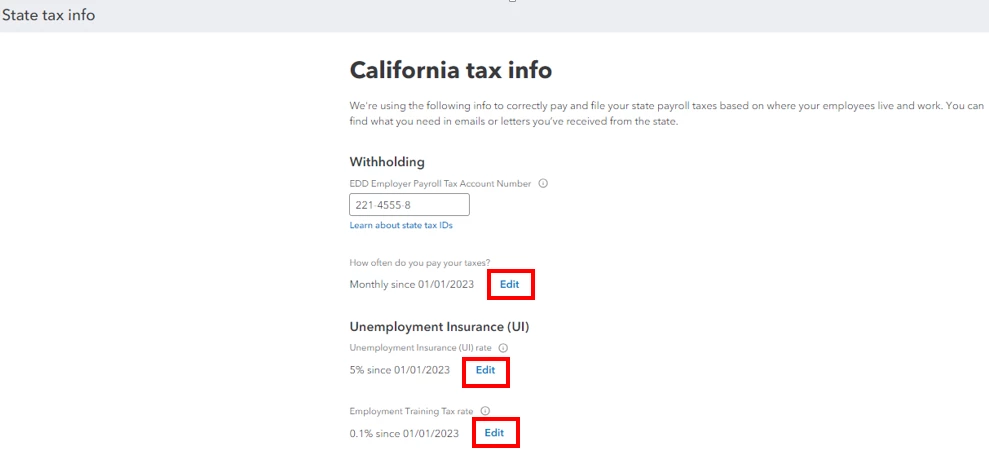

  5. After updating all the necessary details, Submit payroll.
  6. After submitting, run another payroll and change the work location again. Proceed with updating the tax withholding and state tax rates. 


Please check out this link to help you create, manage, assign and update your pay period: Set up and manage payroll schedules.


Comment below if you have additional questions about managing your payroll set up, and I'll circle back to assist you. Take care!

