

January 17, 2025
Question

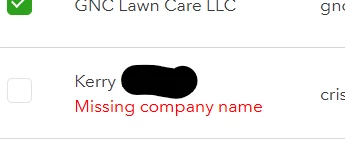
Individual Contractor's 1099 filing won't generate because now "missing company name" after edited address

  • January 17, 2025
  • 1 reply
  • 0 views

Trying to file 1099s and I noticed an INDIVIDUAL contractor's address and name were not capitalized/ spelled incorrectly. I edited them by only capitalizing letters (not changing any pertinent information) and now I am getting "Missing company name" message and cannot file her 1099. Her company name, ie display name was included and correct and had not been altered at all. I found this topic in the general forum but the page redirected back to the main page and did not give the solution. Is this a glitch of some sort or is there a way to address the problem and proceed without involving my contractor and a new W9 because she had a typo?
 

1 reply

January 17, 2025

Thanks for providing detailed information and screenshot on the prompt you've encountered, Usersm. Below are the troubleshooting tips you can perform to get rid of it so you can continue with your payroll tasks.


It's essential to contact your contractor to verify the name they have registered in their QuickBooks system before proceeding with any modifications and submitting the 1099 form. 


Please ensure that the contractor's information contains the company name. If there's already a company name, you can delete it, save the changes, and then re-enter the company name before saving again. This is to refresh the page and help resolve any potential latency issues.


If you continue to encounter the same error, you can perform some troubleshooting steps to determine if this is a browser-related issue. The initial step is to access your QuickBooks Online (QBO) account via incognito mode. This does not store cache files that may cause odd behaviors when running web-based programs. Below are the shortcut keys you can use:


  • Google Chrome: press Ctrl + Shift + N
  • Microsoft Edge: press Ctrl + Shift + N
  • Safari: press Command + Shift +N


Then, generate your contractor's 1099 form and verify whether the error "missing company name" has been gone. If this works, clear the cache of your regular browser to eliminate piled-up data. If the issue persists, you can use another supported browser or device. Might be that the current one you're using has a temporary issue with the program.


Additionally, you can file 1099s in QBO with the IRS and some state if you compensate contractors through cash, checks, or direct deposits.


Furthermore, it may be beneficial to generate 1099 reports to identify which contractors require 1099 forms, as well as to review payment totals and other relevant information. Feel free to read this article: Create 1099 reports in QuickBooks.


On the other hand, you might want to Explore QuickBooks Payroll to help optimizing your payroll processes within the program. Our specialists are available to provide valuable insights and techniques for managing payroll-related activities effectively in the program.


I'm still ready to back you up if you have further questions regarding the missing company error. Just utilize the Reply button below and I'll come back as soon as I can.

January 19, 2025
Thank you for the reply. I had already tried re-entering the name information but did again, saved it but to no avail. Restarted computer, browser, and program, all the usual glitchy fixes with one-off bugs as I literally just corrected/ edited a capitalization from the prep 1099 screen. I opened an incognito window in Chrome and the message was still there, opened a new Edge window and the "missing company name" was still there, ironically under the contractor/ company's name. It will not allow me to proceed with filing the 1099 for that contractor until it is fixed. I filed the other 1099s.
 
I used QBO with this vendor last year to send the 1099 with no problem. She had updated her W9 this year, though. 
 
I'm not sure what to do now, and I definitely need to resolve the issue because I do not want to hand file the form indefinitely.
 
January 19, 2025

We appreciate your patience in following the troubleshooting steps provided above, Usersm. Let me route you to the appropriate support team to ensure you can file your 1099 accordingly.


Since the issue with your company name persists, we need to examine this matter thoroughly and determine its root cause. Therefore, I recommend contacting our technical support team for further assistance. They possess essential tools to conduct a screen-sharing session and guide you through the most relevant fixes.


Here's how to contact them:


  1. Sign in to your QuickBooks Online company.
  2. Go to the upper-right-hand corner and click on (?)Help.
  3. Enter 'technical support' in the Search tab, and hit Contact Us.
  4. Choose either Chat or Callback.


Make sure to check their support hours so you can find out when agents are available.


I also included this article in case you need to amend your 1099s after you've filed them: Correct or change 1099s in QuickBooks.


Our goal is to ensure you get the best experience in QuickBooks. The thread will remain open, so feel free to comment in this thread if you have further questions about creating and filing 1099s.