January 10, 2022
Solved

Printing 3 part 1099 NEC in QB online

  • January 10, 2022
  • 7 replies
  • 0 views

Quickbooks online is printing the 1099 NEC's 2 to a page, instead of 3 to a page.  Am I missing something?  

Best answer by JenoP

I'd be glad to help with your concern about 1099s, JS12345.


I tried to print a 1099-NEC in my QuickBooks Online and I can see that it's printing 3 contractors per page.


Although, the Select a form type and print page is not yet updated and still shows 2 per page. You just need to disregard the picture or icon showing 2 per page and continue printing the form.
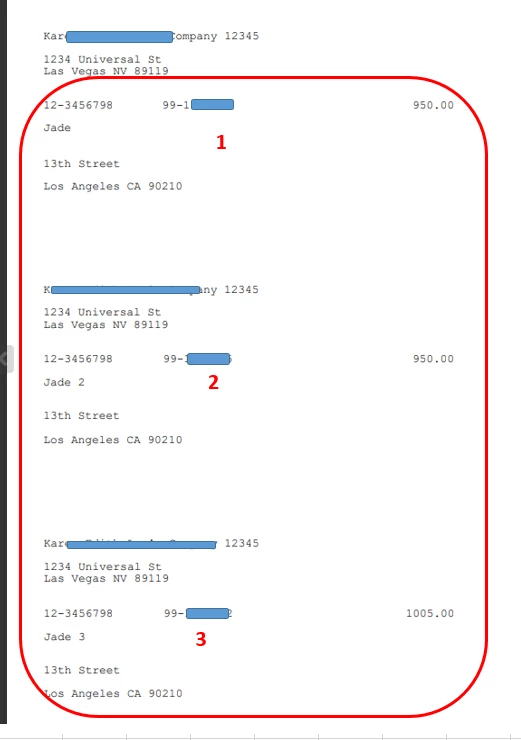


Our engineers were also made aware of the issue and are working to update the page accordingly. I'm also adding this IRS article for further details about 1099-NEC: Instructions for Forms 1099-MISC and 1099-NEC. It contains the complete set of instructions and the latest information about the form.


I'll also be adding a couple of articles as references when preparing your year-end tasks:


Don't hesitate to join us again in another thread or post a new question in the Community if you need anything else. We're always here to offer our help.

7 replies

January 10, 2022

Me too. We've been trying to figure this out for a few hours now. 

January 10, 2022

Hi there, JS12345. 


Thank you for visiting the QuickBooks Community. You should be able to print 3 page1099-NEC forms. If you're unable to view this option, let's check out our guide on printing 1099s in QuickBooks Online.  


Additionally, sometimes your web browser can cause your printer not to print your 1099 forms correctly. Intuit recommends using Google Chrome or Mozilla Firefox. If printing still doesn't work on these recommended browsers, try these steps.


Chrome: 


  1. Go to Chrome and select the three vertical dots in the upper-right corner. Then select Settings.
  2. Select Privacy and security then Site settings.
  3. Select Additional content settings then PDF documents.
  4. Toggle Download PDF files instead of automatically opening them in Chrome.
  5. Try to print your 1099s again.


If it still doesn't align, on the print window, select the dropdown for More Settings to verify Fit to printable area or Fit to paper is not selected in the Scale dropdown.


Firefox: 


  1. Go to Firefox and select menu ≡, then Options.
  2. Select General.
  3. In the Applications section locate Portable Document Format (PDF).
  4. In the Action column select the dropdown and select your PDF viewer.
  5. Try to print your 1099s again.


When downloading as a PDF, if Adobe is not the application that opens the document: 


  1. Right click the PDF.
  2. Select Open with and choose Adobe from the dropdown list.
  3. Try to print your 1099s again.


For more details about filing and printing 1099s, check out Create and file 1099s using QuickBooks Online.


Please let me know if you have further questions or concerns. I'll be here every step of the way. You can always reach out to the Community or me any time you need a helping hand. Take care!

January 10, 2022

That is not the issue.  There is no selection to print on a 3 part form: I get 3 options:


1- 2 part nec form

2-  2 part misc form 

3- 1096


I've attached a pic of the screen

January 24, 2022

The newer version of Qbooks provides the correct formatting but also required I update my operating system.  I do accounting for 26 companies so it was worth it for me.

January 19, 2022

We use Quickbooks Enterprise and there is absolutely NO OPTION to print 3 per page as the new IRS Forms allow for!  What a joke!  Now I have to HAND WRITE 100's of 1099's.  Thanks Quickbooks!!!!!

MonicaM3
January 19, 2022

Good Morning @Impact1.


Thanks for checking in with the Community regarding 3 per page 1099s. I'd like to help you get the update so that you can print them. All QuickBooks Desktop versions 2019 or newer should have the ability to print 3 per page 1099s if the most current update has been done. 


To confirm which release you have, hit the F2 button when logged in to QuickBooks, this opens the Product Information screen, look at the release version extension...it'll be the underscore and a number.

  • QB 2022 R3_(71+)
  • QB 2021 R8_(62+)
  • QB 2020 R13_(39+)
  • QB 2019 R16_(55+) 


If your product information shows the release version and extension listed above or higher, you’re good to go and have the capability to print the 3 part 1099 forms. If your product release and version is lower than those listed, you’ll need to update your QuickBooks.


It’s important to make sure to update QuickBooks to the latest release. I've outlined the steps below:

  1. Go to the Help menu and select Update QuickBooks Desktop.
  2. Go to the Update Now tab. Tip: You MUST select the Reset Update checkbox to clear all previous update downloads.
  3. Select Get Updates to start the download.
  4. When the download finishes, restart QuickBooks.
  5. When prompted, accept the option to install the new release.


Once you’ve gone through the update process, hit F2 again and confirm the release version and extension has updated. If not, try updating again.


A few things to keep in mind:

  1. Multi-user mode- All additional users must be logged off, then the QuickBooks Admin can log in and update QuickBooks, then close and restart. If other users are logged in during this process, those files won’t update.
  2. If you’re using a hosted network or have a hosting service, you may need to reach out to them to confirm the latest updates have been pushed.
  3. If you have an anti-virus/firewall installed, you may need to adjust your settings or reboot in safe mode to allow the updates. If the anti-virus/firewall software is causing the update not to download, then the update will download in safe mode and will install after closing and reopening the file.

Please let me know how it goes, and feel free to reach out with any additional questions. I'll keep an eye out for your reply.


Thanks!

January 19, 2022

We are using QBs Enterprise Desktop on a network - still cannot print three to page.  I am attaching two screen shots of our system - Tech says he updated everything - can you check versions?

KlentB
January 20, 2022

I'll make sure that you'll be able to print the form, shannonz.


You'll want to try the other troubleshooting procedures listed in this article: Print 3-part 1099s in QuickBooks Desktop. If you're still experiencing the same problem after performing the the steps, I'd still recommend review your setup and investigate why you're unable to print in 3 part Form 1099. Here's how to get in touch with us:


  1. Open QuickBooks Desktop.
  2. Go to the Help menu, then select QuickBooks Desktop Help.
  3. Click Contact Us.
  4. Enter "Unable to Print 3-part Form 1099.", then select Let's talk.
  5. Choose a way to connect.

Additionally, I'm adding this article to help you in completing your year-end task: Year-end guide for QuickBooks Desktop.


If there's anything else you need, please let me know by clicking the Reply button below.  Take care.

January 28, 2022

that did not work!

January 24, 2022

You will need to upgrade to a new Quickbooks version for the new 3 part forms.   Be careful as I had to purchase 2021 and it caused me to need a newer operating system which was a lot to have to deal with.

January 28, 2022

Thanks for joining this conversation, @pc26. I'll make sure you can print your 1099 forms in QuickBooks Online (QBO).


There are also times when a browser's cache data becomes full from frequent access to web pages or is damaged. This causes unexpected behavior when printing the 1099 NEC form in QBO. 


To better isolate this issue, let's try signing in to your account using a private or incognito window. This mode doesn't use the existing cache data and helps us confirm browser-related issues. To save you time, use either of these keyboard shortcuts:


  • Google Chrome: press Ctrl + Shift + N  
  • Mozilla Firefox: press Ctrl + Shift + P
  • Safari: press Command + Shift + N

 
If it works, go back to your regular browser and clear its cache. Clearing the cache or cookies is the best way to get a clean slate for your browser. Otherwise, using other supported browsers can be a good alternative too.


If printing still doesn't work on these recommended browsers, try these steps.

Chrome:


  1. Go to Chrome and select the three vertical dots in the upper-right corner. Then select Settings.
  2. Select Privacy and security then Site settings.
  3. Select Additional content settings then PDF documents.
  4. Toggle Download PDF files instead of automatically opening them in Chrome.
  5. Try to print your 1099s again.


If it still doesn't align, on the print window, select the dropdown for More Settings to verify Fit to printable area or Fit to paper is not selected in the Scale dropdown.

Firefox:


  1. Go to Firefox and select menu ≡, then Options.
  2. Select General.
  3. In the Applications section locate Portable Document Format (PDF).
  4. In the Action column select the dropdown and select your PDF viewer.
  5. Try to print your 1099s again.


When downloading as a PDF, if Adobe is not the application that opens the document:


  1. Right click the PDF.
  2. Select Open with and choose Adobe from the dropdown list.
  3. Try to print your 1099s again.


Additionally, you can check out this article to learn more about printing 1099 forms. Also, visit this article to get answers to your 1099s questions.


Please know that you're always welcome to post in the Community if you have any other printing concerns in QBO. Wishing you and your business continued success. Take care! 

February 7, 2022

I was able to print the 1099-NEC but for some reason or another box 1 does not show the amount and QB can not tell me why. Also how can I print the 1099-NEC for the people that did not make 5000 or more??

DivinaMercy_N
February 7, 2022

Hi there, @acarreon. I'm here to ensure, you'll be able to print your 1099-NEC in QuickBooks Desktop (QBDT).


In form 1099-NEC, Box 1 will not be used for reporting under section 6050R, regarding cash payments for the purchase of fish for resale purposes. For more information about the boxes in 1099-NEC, please visit this article: Understand payment categories for the 1099-MISC and 1099-NEC.


Also, you are only required to file a Form 1099-NEC for anyone that you paid $600 or more in the prior year as well as those people you’ve withheld any federal income tax from under the backup withholding rules. Check it here for more details: Do I need to file a 1099-NEC?.


Once everything is set, here's how you can print 1099-NEC:

  1. Ensure first that your QuickBooks Desktop program is updated to the latest release. 
  2. Next, create your 1099s in QuickBooks.
  3. From the Choose a filing method window, click the Print 1099-NEC.
  4. Set the date range for the forms then choose OK.
  5. Select all vendors you wish to print 1099s for.
  6. Then, click the Print 1099 button.
  7. Confirm your printer settings then select Print.


See this link for your reference about the process: Print your 1099 forms.


Also, you can run 1099 reports in QBDT to easily track your 1099 information as well as those vendors or contractors that need this form. 


Don't hesitate to leave a reply below if you have any other 1099 concerns. I'm just a post away to help. Have a great day ahead.

February 7, 2022

Hello,


when I print my 1099 NEC the amount is not showing in box 1 for any of my employees. also how do I uncheck box 2. I have the QB plus online program.
