Solved
QB online is all of a sudden sending sale tax payable amounts to my payroll tax account and not sales tax payable. It is all automatic now. How do I correct this?
Original commenter did not share additional details


Any ideas how to fix this?
Hello, Barbie.
There are certain accounts in your QuickBooks Online account, such as the Sales Tax Payable account that can't be modified, deleted, or made inactive. That's the reason why you encounter such a message. It is automatically created when you set up sales tax and reports the sales tax for every transaction.
You can check this article for more information: Manage default and special accounts in your chart of accounts.
You can consider creating another account with the updated information. Afterward, edit the default account and merge both. However, making these changes can potentially affect your books, so it's best to consult your accountant before proceeding.
Here are some detailed steps to guide you through this process:
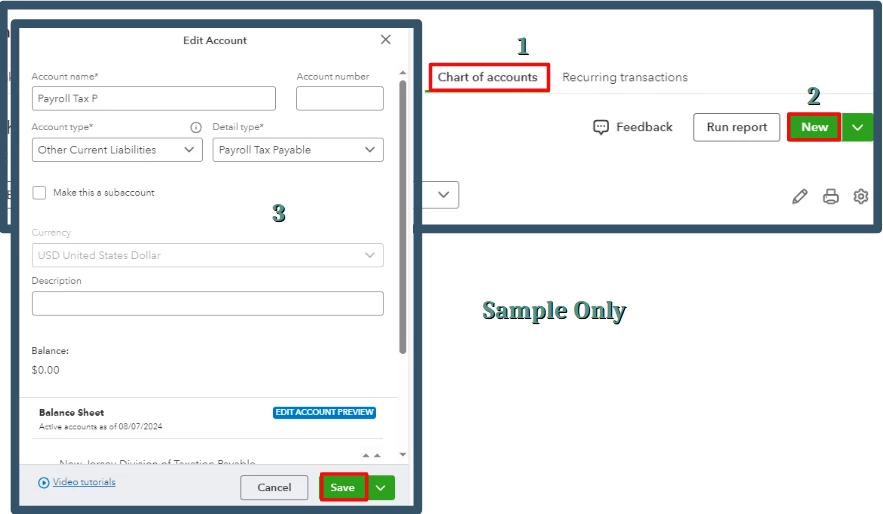
Now open the default Sales Tax Payable or Payroll Tax Payable. Edit the name to the same as the account you created above. Please follow these steps:
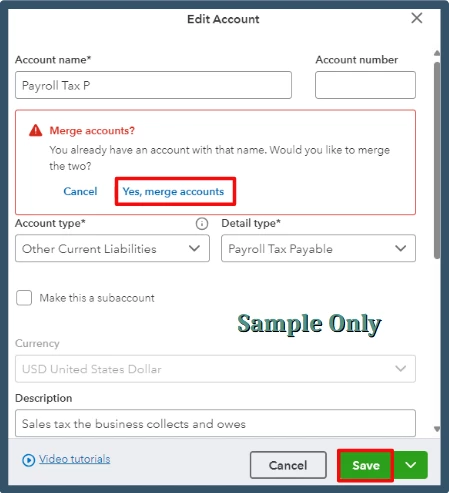
For additional resources, I'm adding these articles to help manage your accounts and help you choose the appropriate detail type for your transactions:
Consulting your accountant will ensure your financial records are correct and up-to-date. They can also help you review your accounts and offer you alternative approaches to fix this.
Enter your E-mail address. We'll send you an e-mail with instructions to reset your password.