

December 4, 2024
Question

Use customer defined tax rate instead of automatic sales tax

  • December 4, 2024
  • 1 reply
  • 0 views

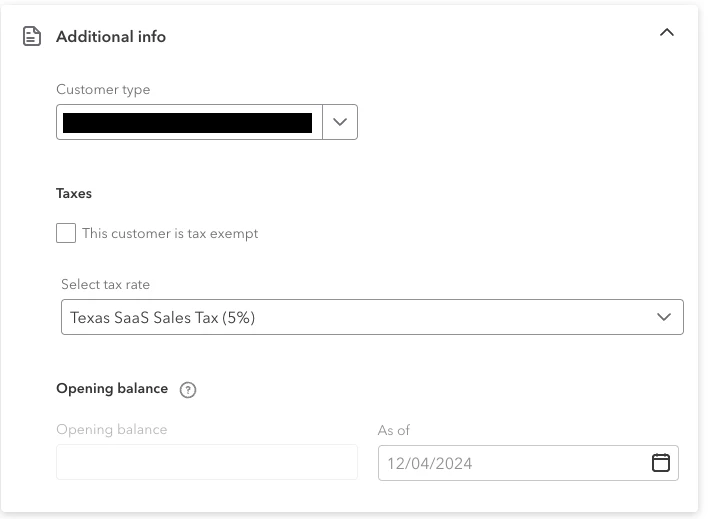
Has anyone found a solution to use the tax rate defined in the customer's 'Additional info' ? If not, what is that field for? I would love to be able to turn off anything to do with automated sales tax and just use that rate for each customer. Location based sales tax will not work for us. If I attempt to override the `TxnTaxDetail.TxnTaxCodeRef` through the API, it is ignored and set to "Automatic Calculation."

I'm currently seeing the best course of action being using the API to manually grab the rate defined in the customer's additional info, hand calculate the tax line, and push it along to each invoice. This seems a bit silly though because the desktop version did all of this for us.
 

1 reply

December 4, 2024

I’m here to guide you in connecting with the right channel that can help you tackle the issues you’re facing with the sales tax rate and ensure that the application is integrated effortlessly to meet your needs.


We have a dedicated platform for developers and users to share insights and solutions on API errors and other integration challenges. This community is designed to empower you with the knowledge and skills needed for efficient troubleshooting. I recommend posting your inquiry in our Intuit Developer Community for further assistance.


Here's how:


  1. Go to this link: Intuit Developer Help.
  2. Choose QuickBooks Online under the section What do you need help with?
  3. Click Ask a Question.
  4. Log into your existing Intuit Developer Account or create a new one.
  5. Type your concerns or questions in the designated field.
  6. Click the Ask button to submit.


To help you record, adjust, and delete sales tax payments in the Tax Center in QuickBooks Online, check out this article: Manage sales tax payments in QuickBooks Online. It also provides information on how to handle sales tax payment issues.


If the accounting method affects your sales tax, here's a great resource you can visit to learn the difference between Cash and Accrual methods for QuickBooks Online, and how to switch between the two: Choose between cash and accrual accounting methods in QuickBooks Online.


Our community forum is here for all your QuickBooks inquiries, particularly when it comes to the tricky aspects of sales tax. Don’t hesitate to drop a comment below. We look forward to assisting you again soon.