January 12, 2019
Solved

W2/W3 E-file error for Federal and State

  • January 12, 2019
  • 3 replies
  • 0 views

Hello,

I have no issues creating my W2 forms for both federal and state e-file.  No errors.


My issue is the e-file button is greyed out and I cannot click it when the forms are created.  Same problem for Federal and State.


Click the "why can't I efile" link just has the help box pop open with a few script errors.


I do have enhanced payroll and can e-file my quarterly forms without an issue to both the state and federally.


And my understanding is sending the W2 forms doesn't even require and account.  Just email address and phone number.


Any suggestions?
Best answer by JenoP

Hi there, Jbmos. 


Yes, e-filing the Annual Form W-2 does not require an account or a pin. Let's make sure that the filing method for this form is set to e-file. Please follow these steps:


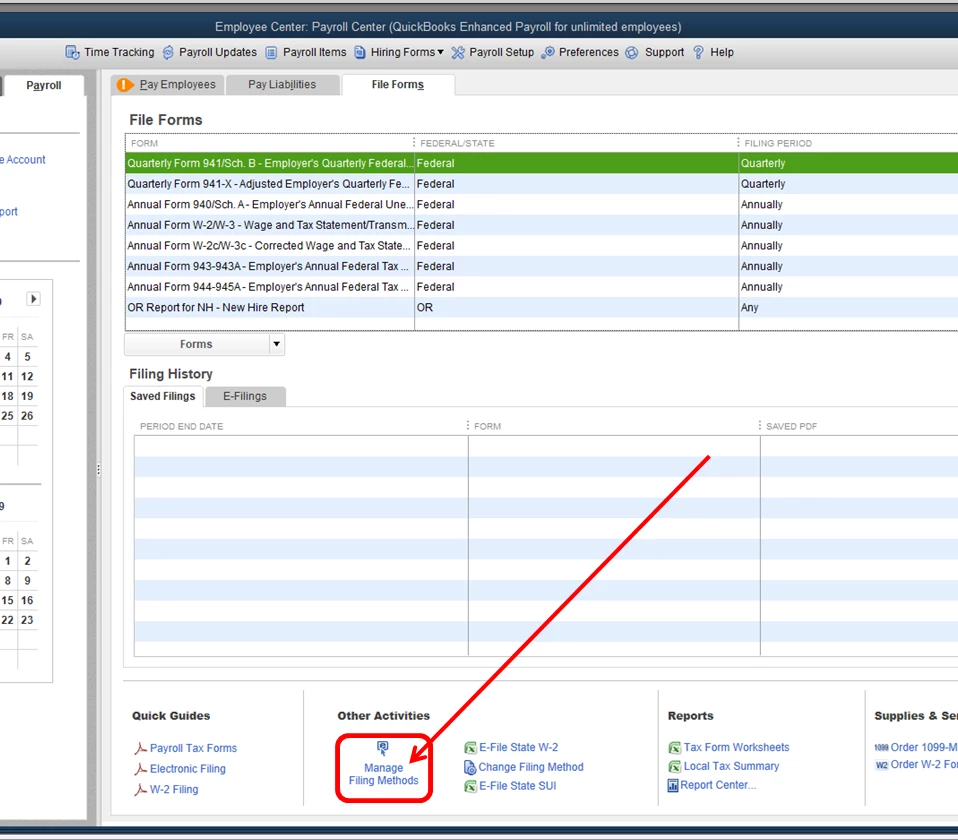
  1. Go to the File Forms tab.
  2. Click Manage Filing Methods under Other Activities.
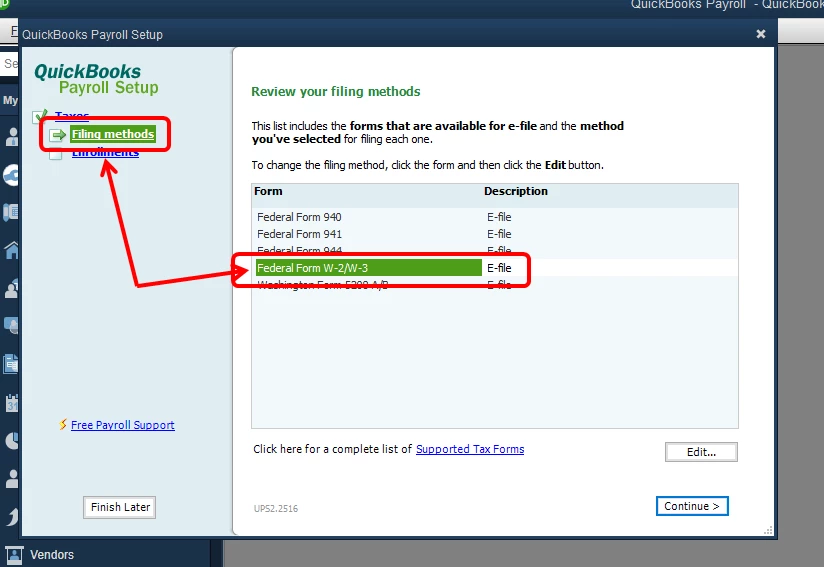
  3. Click Filing Methods, then double-click Federal Form W-2/W-3.
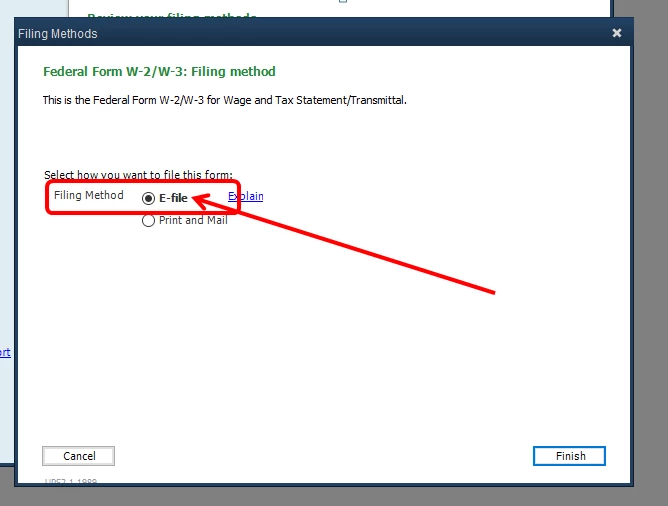
  4. Select E-file, then click Finish.
  5. Click Finish Later.

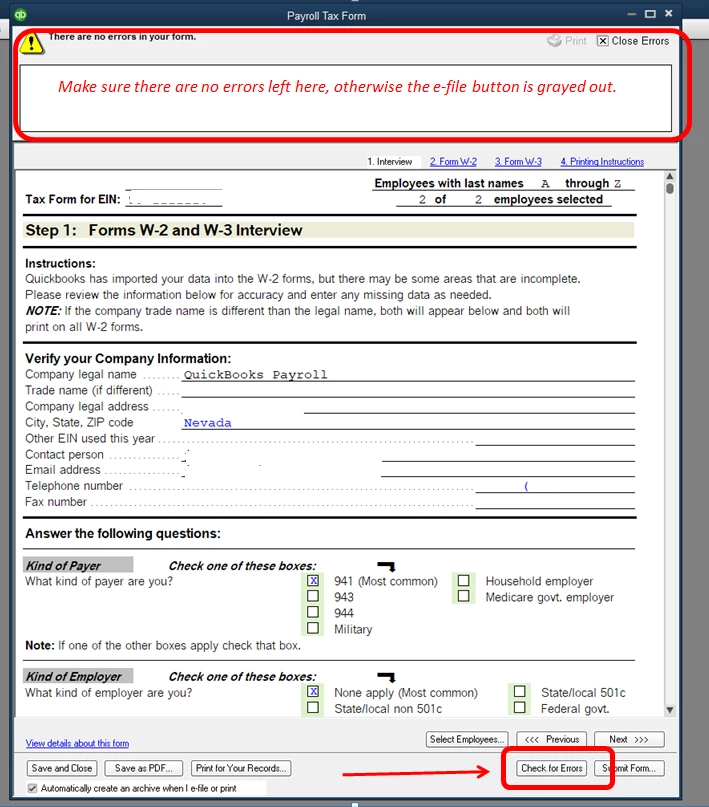
Once done, open the tax forms once again. Then, click the Check for Errors button at the bottom. Make sure there aren't any errors left so the E-file button isn't grayed out. 


I've added some screenshots below for more details. Let me know if you need anything else. 


3 replies

JenoP
JenoPAnswer
January 14, 2019

Hi there, Jbmos. 


Yes, e-filing the Annual Form W-2 does not require an account or a pin. Let's make sure that the filing method for this form is set to e-file. Please follow these steps:


  1. Go to the File Forms tab.
  2. Click Manage Filing Methods under Other Activities.
  3. Click Filing Methods, then double-click Federal Form W-2/W-3.
  4. Select E-file, then click Finish.
  5. Click Finish Later.

Once done, open the tax forms once again. Then, click the Check for Errors button at the bottom. Make sure there aren't any errors left so the E-file button isn't grayed out. 


I've added some screenshots below for more details. Let me know if you need anything else. 


JbmosAuthor
January 14, 2019

Jeno,

Thank you.


The submission method was already set to e-file.  But I went ahead and told it to set it up as e-file a second  time.


And then it worked.  I was able to submit federal and state with no problem.


I appreciate the help.


John

JenoP
January 15, 2019

Hi again, John.


I'm glad that you're able to e-file your w-2s. Don't hesitate to visit the Community again if you have other questions. 


See you around!

January 17, 2019

I got a error message, rejected filing for duplicate submission. How do I correct this

HoneyLynn_G
January 18, 2019

Hi there, @tscott1118.


Thank you for joining us in this thread. I can help you correct the rejected e-file form.


On the E-filing Rejected window, you have the option to view the solution messages sent by the agency:

  1. Click Employees.
  2. Choose Payroll Center.
  3. Choose the File Forms tab.
  4. In the Filing History section, click E-Filing tab.
  5. Click the Agency Rejected link.
  6. Check and follow the solution provided by the agency.


I also advise getting in touch with IRS if you need further assistance or you have additional questions. That should get you on the right track, tscott1118.


Keep me posted about this. I'd like to make sure this is taken care of. Also, click the "Reply" button if you have other payroll questions for me. I'd be happy to answer them all for you.

April 29, 2019

We e-filed our federal and Wisconsin 2018 W-2s from inside of QuickBooks 2017 and we thought all was fine. File was marked received and then marked accepted by both agencies back in January 2019. 

Unfortunately now we've received a letter from the Wisconsin Dept of Revenue that in that file they only received 221 of our 226 W-2s. So the W-2s need to be resubmitted via EFW2 text files. 

From within QuickBooks Desktop, I tried to send the file again using the draft version that had been created back in January, but I received an Error message that said, "Problem: The submission is a duplicate of one that was previously received. Solution: Please contact customer support." There's also a link "How to Contact Support" in that Error message box. The link took me to the QuickBooks Community and here I am... 

When I went to the File Forms tab of Payroll Center and clicked on the E-Filing tab of the Filing History section, I received a message box labeled "E-Payments/E-Filings Not Sent" that said, "A connectivity problem prevented us from receiving the following transactions, so we can't send the payments and/or forms to the agency. Before you can resubmit the payments/forms, you must first delete the transactions from your company file. To do so, click OK and then resubmit your payments/forms. For instructions, click Help." Help did NOT help -- took me to a generic 'do you have a question' screen. I clicked OK and now don't know how to delete the transactions from our company file in order to proceed... 

Any suggestions?? 

Thanks!!

Meeg

February 22, 2020

My email [email address removed] can i please get me w2

February 22, 2020

It's my priority for you to get your W-2 form, Patrick 27.


If you are an employee and want to get access to your W-2 form, you can inform your employer to send you an invite to access it online. This way, you'll see your W-2s from the current tax-filing season in Workforce. For more details about this one, just refer to this article: Set up and Invite employees to see pay stubs and W-2s in Workforce


However, you can access your W-2 form in QuickBooks and save it as a PDF file for you to send it to your email address (if you are the employer). You can check out this article for the steps and details: Print W-2 and W-3 forms. Then, follow the steps in Step 1 to Step 3 section to export the form.


Keep me posted if you need a hand with sending or viewing your pay stubs in the Workforce or any QuickBooks. I'll be here to help.