November 29, 2021
Solved

2021 QuickBooks Desktop prints 2 part 1099 NEC forms

  • November 29, 2021
  • 32 replies
  • 0 views

When desktop QuickBooks will update printable 2021 NEC forms from 2-part to 3-part?

I have 2021 QB Pro.

Best answer by AileneA

Kayte, I personally think those that can now print 3-up 1099NEC's are using the QBO version. QBDT-of any year/version- is still not patched/updated. ANYONE correct me if I am wrong. If you have been able to get QBDT PRO 2020 to print 1099NEC 3-up, let us know what you did to progress. Of course, once I get the dang update, I will be off the grid and getting my1099NEC's started and finished hopefully, but by that time we all will have the patch/update.


Hello there everyone! 


I understand you need to be able to print the 1099-NEC forms since it’s time for tax filing. And with that, I have good news to share with all of you. You should now be able to print 3 to a page for 1099-NEC. All you need to do is make sure you are on the latest releases with the appropriate critical fixes. 


Here’s how:


1.   Go to the Help menu.
2.   Click Update QuickBooks Desktop.
3.   Go to the Options tab and click Mark All, then Save.
4.   Tap the Update Now tab.
5.   Make sure Critical Fixes is checked.
6.   Then click Get Updates.
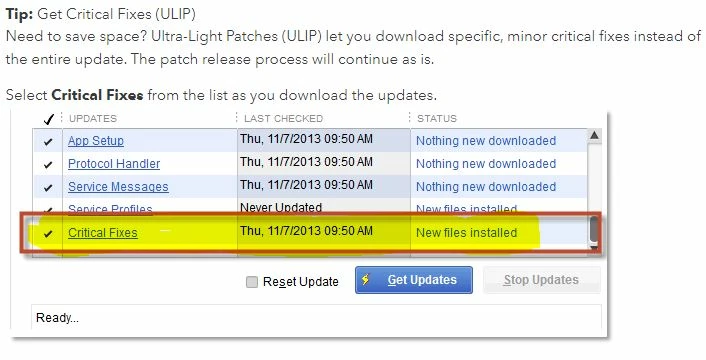


When the update is finished, close and reopen QuickBooks Desktop. Click Yes to install the updates, then restart your computer.


Please feel more than welcome to send a reply if there are any additional questions about printing the 1099-NEC 3 per page. I'll be right here to help you.

32 replies

January 21, 2022

I tried this but it did not work for my new 2022 QB Desktop version (just purchased this week)? It is still printing 2 Form 1099-NEC forms to a page, rather than 3 to a page as now required by IRS? Is there another fix or process I need to do? These are due within 10 days, so I need a fix ASAP.  Thank you!!

January 22, 2022

How do align the 3 part 1099-NEC? I can get them to print but only 1 out of 3 is lined up properly on the sheet without information being cut off. The other two need information moved in the opposite direction of one another so no matter what information will be cut off of some of the forms.

Adrian_A
January 22, 2022

.Let me assist you in printing 1099, arl686s


There's an option in QuickBooks Desktop to align the form 1099. You'll want to follow these steps:

  1. Go to the File menu and select Printer Setup.
  2. From the Form Name drop-down, choose 1099s/1096.
  3. Tap the Align button and make the adjustment. You can also print a sample by clicking Print Sample.
  4. Click OK twice to save the changes.

Before that, make sure that your QuickBooks is up-to-date. Also, you can run the QuickBooks Print & Print Repair Tool to fix issues in printing forms.


Once done, print the 1099 forms again. For the detailed steps, here's how to align forms in QuickBooks Desktop.


Leave a comment again if you need anything else. We'll respond as soon as we can.

January 22, 2022

This still does not fix the problem. i still have 2 1099's on the page that have information cut off or in the incorrect box

January 22, 2022

I am using QB 2018 Desktop Pro. Is there a way for me to print the 3-up 1099 NEC forms?  I have done all the updates, but it is only printing 2-up.

January 22, 2022

My QuickBooks 2022 has downloaded the Critical Update but, won't install it. It tells me it's waiting to install, to, exit and restart QuickBooks.  I've done this multiple, multiple multiple times.  Now it gives me Error #15240.  How do I fix this?  I spent hours trying to resolve this.

January 22, 2022

I finally figured it out everyone!  When you go to do the update tick the box that says 'Reset Update'. Then click 'Get updates'. My product release number was R3-65. Not it is R3-78 and I can now print 1099-NEC with 3 on the page!!  YEAH!!!

January 24, 2022

Thank you!  This worked for me.  After clicking the "reset update" button and then clicking "get updates", there was a box that showed the updates in progress.  When they were done, I closed everything up and turned off my computer.  Took a short sanity break.  Turned on computer.  When I opened QB, the signature green circle came up with a small "updating Quickbooks . . . . ." message and then opened.  I can now print 3-up 1099s!

January 25, 2022

Has anyone been told by Quickbooks that they have to have the payroll add-on in order to get the 1099 update? We have Enterprise and we've always been able to run 1099's without any payroll add-ons. Last year we had one person tell us we wouldn't be able to run them anymore without getting payroll and then once we almost had it completely installed and paid for the next person told us it wasn't necessary. Now we are being told again that we won't get any 1099 updates without adding payroll. Just wondering if anyone else is hearing this as well?

January 27, 2022

I have spent the past 3 hours trying to get the 1099 NEC to print. Yes, I have followed the instructions. Now I can't get any 1099 to print at all rather right or wrong. I need to be able to give out 1099 tomorrow with payroll. 

January 30, 2022

USE ANOTHER SOFTWARE! TaxRight!  Free Software came with forms purchased at Office Depot. I spent 16 hours following all advise to get QuickBooks AND TurboTax to print 1099-NEC in the right form (3 to a sheet) or red line Copy A & 1096. Talked an hour with Intuit Advisor, she had to admit there is NO FIX and no news IF the problem would be fixed BEFORE deadline. . . Monday 1/31/2022!!! Thanks to TaxRight I have successfully completed my clients 1099-NEC and 1096 filings and distributions. 

January 30, 2022

Bottom Line here is Intuit and Quickbooks both stink, to put it politely.  the only reason QB is still around is they got such dominant market share back in the heyday.  It really is painful to use the desktop versions.  I guess they just want everyone to go to online subscription, I doubt that stuff is any better but maybe it is.   Thanks for your referral to elsewhere.

January 31, 2022

I see there are several posts of ways others got their 1099-NECs done, none worked still! I have not found that the "new" Intuit subscription works any better! Intuit is moving to mandating online only service via subscription. The desktop doesn't work as well as it used to due to having to sign in to Intuit QuickBooks to "stay up to date" or whatever. Then you're not able to get anything "fixed" there either but they push going to Live Subscription. So sad after so many years of a good product! 

February 4, 2022

Hello,

We fixed the issue by doing the following :

Force the update of QuickBook Desktop to the latest release (R16_61 as of today 2/3/22)

1.  Close QB. Right click and run as administrator. (important)

2. Log in. Help>Update QB Desktop>Update Now. Make sure ALL boxes are checked off. 

3. Click on  'Reset Updates' > Get Updates.  Once update completes, close and restart QB.

4. Restart your computer to install updates. Login to QB.


Updates may have defaulted back to the original 1099-Misc mapping. 

Once all set, change all the 1099-Misc accounts to "omit these payments from 1099". After making the changes, you should be able to update the 1099-NEC accounts.


You now should be able to print 3 to a page. 

Go to file>Printer Forms>1099/1096

Make sure to Map Vendor Payment Account by selecting NEC Box 1. 

February 14, 2022

How can I print 1099 forms 2 per page? This year when I went to print our 1099 forms it printed 3 per page over the forms we purchased which are 2 per page. 

February 15, 2022

Welcome to the Community, @James Powers. Let me share some insights about printing 1099 NEC forms in QuickBooks Desktop.


With QuickBooks' new update, you will now have the three pages of the 1099 NEC form once your QuickBooks Desktop version is updated. We don't have the option to go back to the old interface where you can get two pages.


I'll be sharing with you this article as your reference in creating and filing the 1099 NEC form in QuickBooks Desktop: Create and file 1099s with QuickBooks Desktop.


You can click the Reply button below if you need additional assistance with about 1099 NEC forms using QuickBooks Desktop. I'm always here to help.
