November 29, 2021
Solved

2021 QuickBooks Desktop prints 2 part 1099 NEC forms

  • November 29, 2021
  • 32 replies
  • 0 views

When desktop QuickBooks will update printable 2021 NEC forms from 2-part to 3-part?

I have 2021 QB Pro.

Best answer by AileneA

Kayte, I personally think those that can now print 3-up 1099NEC's are using the QBO version. QBDT-of any year/version- is still not patched/updated. ANYONE correct me if I am wrong. If you have been able to get QBDT PRO 2020 to print 1099NEC 3-up, let us know what you did to progress. Of course, once I get the dang update, I will be off the grid and getting my1099NEC's started and finished hopefully, but by that time we all will have the patch/update.


Hello there everyone! 


I understand you need to be able to print the 1099-NEC forms since it’s time for tax filing. And with that, I have good news to share with all of you. You should now be able to print 3 to a page for 1099-NEC. All you need to do is make sure you are on the latest releases with the appropriate critical fixes. 


Here’s how:


1.   Go to the Help menu.
2.   Click Update QuickBooks Desktop.
3.   Go to the Options tab and click Mark All, then Save.
4.   Tap the Update Now tab.
5.   Make sure Critical Fixes is checked.
6.   Then click Get Updates.
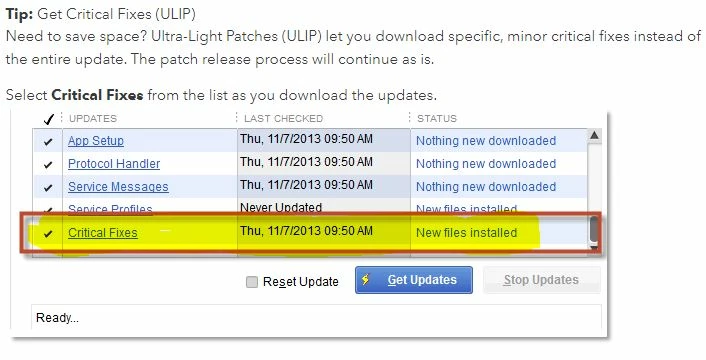


When the update is finished, close and reopen QuickBooks Desktop. Click Yes to install the updates, then restart your computer.


Please feel more than welcome to send a reply if there are any additional questions about printing the 1099-NEC 3 per page. I'll be right here to help you.

32 replies

January 16, 2022

i cannot print the 3 to page 1099 NECs and i have done the updates as listed below. any ideas on what might be going wrong?

January 16, 2022

NOT WORKING - what to do next??

January 17, 2022

I Did all that and the forms still dont print  And when you look at other post areas for Qbooks they actually dont show a date for the actual release.  I have searched a lot so if I missed something we are still waiting...

January 17, 2022

Good morning - I am very thankful Sabrina from the Accountant Care team was able to spend another 2 hours with me on Friday.  This makes a total of 4 1/2 hours on this issue with IT support. 


For those of you still having issues, you may think you've run all of the updates because the Update Now tab  says Nothing New Downloaded but you need to check the box at the bottom Reset Update.  This prompted updates that I could not see to pop up.  This screen can be deceptive that you are fully up to date when you are not. 


We had several updates that needed to be run and all run individually and required restarts of the computer in order to get them all installed to print the 3 up's.All good now.

January 18, 2022

When you do the updates you must click on "reset updates" in order for the update to download to print 3 per page.

January 17, 2022

I did my updates as per the steps.  Now it will not print anything.  The printer is working.  It printed by paystubs and other forms, but will not print the 1099's?  Any ideas?


January 18, 2022

I am still unable to print my 1099's aligned properly even after doing the updates and upgrading to 2022.

January 18, 2022

I have 2022 QB Pro and spent 3 hours on the phone with the QB help staff last Wednesday. They tried everything to get my computer to print 3 part 1099-NEC 

forms, finally admitted it wasn't working and then told me to call back in a few days. Has anyone yet gotten their 2022 QB Pro to print out 3 part forms?

January 18, 2022

Finally got the help I needed from QB Call staff - I had to click "reset Update" and run the updates again, restart my program, run a payroll update and it finally is coming up 3 per page. **Note I had to remap my 1099 account to get them in the NEC form but that was the easy part!!

January 19, 2022

I have updated quickbooks 2022 and was printing 1099 NEC yesterday.  Today however they are out of alignment and I can't get them to print correctly.  Is there an issue I am not aware of?


January 19, 2022

I finally got things working, but QB is such a hot mess.  Why on earth does a software updating system show that there are no available updates when there are updates???  It's completely stupid.  It's an embarrassment that such a profitable company has such incompetence.

January 20, 2022

Hello, mamakatzman. 


Let me share some information about what is error 15241 in QuickBooks Desktop. 


If the payroll software update does not go through correctly, QuickBooks error 15241 appears. The system will then notify you of the QB payroll update on a regular basis, and you will be unable to install it. The QuickBooks Desktop File Copy Service (FCS) is most likely disabled, which is why this is happening. Updating software to the latest release can resolve the error.   


To fix the error you've encountered, please follow the steps by steps procedure in this article: Error 15241


Feel free to post a reply if you have other questions about your QuickBooks Desktop. I'll get back to you. Stay safe!

January 21, 2022

I have Quickbooks Premier 2021; at first, I could only print the old 2-part 1099 NEC; then, I made sure I had all current updates, including "critical fixes."  After all this, and updating, now I can't even preview my 1099s and they aren't hitting the print que.  Does anyone know a fix for this?

January 21, 2022

See my earlier posts,  you may think you've run them all, but the only way to be sure is to Help from the top tool bar and down to Update QuickBooks Desktop - click on Update Now tab and check the box Reset Update and then get updates again.  It will prompt that you need to restart the program to install them.  Once you close the program, right click on the icon and choose Run as Administrator.  


You will need to do this process over and over until nothing else is left to update.  It took me between 4 and 6 times depending on what version 19 - 21 to get them to view and print 3 up.  


Hope this helps,

January 21, 2022

Thank you - I Finally got it to work - appreciate the great input!!
